1. Table UI
1.1. FilterTable
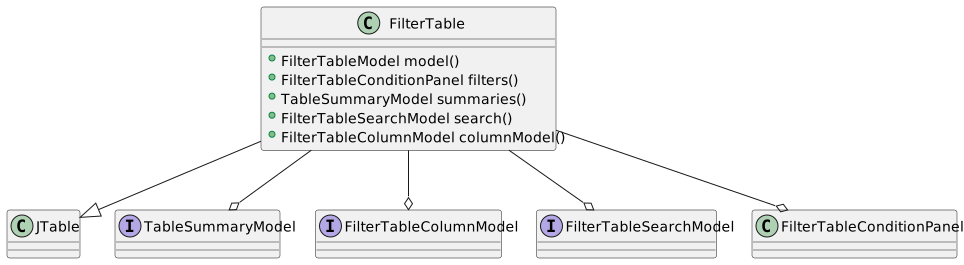
The FilterTable is a JTable subclass central to the framework.
// See FilterTableModel example
SwingFilterTableModel<Person, String> tableModel = createFilterTableModel();

FilterTable<Person, String> table =
        FilterTable.builder()
                .model(tableModel)
                .cellRenderer(Person.AGE, Integer.class, renderer -> renderer
                        .horizontalAlignment(SwingConstants.CENTER))
                .doubleClick(Control.command(() ->
                        tableModel.selection().item().optional()
                                .ifPresent(System.out::println)))
                .autoResizeMode(JTable.AUTO_RESIZE_ALL_COLUMNS)
                .build();
1.1.1. Columns
FilterTableColumnModel<String> columns = table.columnModel();

// Reorder the columns
columns.visible().set(Person.AGE, Person.NAME);

// Print hidden columns when they change
columns.hidden().addConsumer(System.out::println);

// Hide the age column
columns.visible(Person.AGE).set(false);

// Only show the age column
columns.visible().set(Person.AGE);

// Reset columns to their default location and visibility
columns.reset();
1.1.2. Search
FilterTableSearchModel search = table.search();

// Search for the value "43" in the table
search.predicate().set(value -> value.equals("43"));

RowColumn searchResult = search.results().current().get();

System.out.println(searchResult); // row: 1, column: 1

// Print the next available result
search.results().next().ifPresent(System.out::println);
2. Input Controls
2.1. Control
State somethingEnabledState = State.state(true);

CommandControl control = Control.builder()
        .command(() -> System.out.println("Doing something"))
        .caption("Do something")
        .mnemonic('D')
        .enabled(somethingEnabledState)
        .build();

JButton somethingButton = new JButton(control);

Control.ActionCommand actionCommand = actionEvent -> {
  if ((actionEvent.getModifiers() & ActionEvent.SHIFT_MASK) != 0) {
    System.out.println("Doing something else");
  }
};
CommandControl actionControl = Control.builder()
        .action(actionCommand)
        .caption("Do something else")
        .mnemonic('S')
        .build();

JButton somethingElseButton = new JButton(actionControl);
2.2. ToggleControl
State state = State.state();

ToggleControl toggleStateControl = Control.builder()
        .toggle(state)
        .build();

JToggleButton toggleButton = Components.toggleButton()
        .toggle(toggleStateControl)
        .text("Change state")
        .mnemonic('C')
        .build();

Value<Boolean> booleanValue = Value.nonNull(false);

ToggleControl toggleValueControl = Control.builder()
        .toggle(booleanValue)
        .build();

JCheckBox checkBox = Components.checkBox()
        .toggle(toggleValueControl)
        .text("Change value")
        .mnemonic('V')
        .build();

Value<Boolean> nullableBooleanValue = Value.nullable();

ToggleControl nullableToggleControl = Control.builder()
        .toggle(nullableBooleanValue)
        .build();

NullableCheckBox nullableCheckBox = Components.nullableCheckBox()
        .toggle(nullableToggleControl)
        .build();
2.3. Controls
Controls controls = Controls.builder()
        .control(Control.builder()
                .command(this::doFirst)
                .caption("First")
                .mnemonic('F'))
        .control(Control.builder()
                .command(this::doSecond)
                .caption("Second")
                .mnemonic('S'))
        .control(Controls.builder()
                .caption("Submenu")
                .control(Control.builder()
                        .command(this::doSubFirst)
                        .caption("Sub-first")
                        .mnemonic('b'))
                .control(Control.builder()
                        .command(this::doSubSecond)
                        .caption("Sub-second")
                        .mnemonic('u')))
        .build();

JMenu menu = Components.menu()
        .controls(controls)
        .build();

Control firstControl = Control.builder()
        .command(this::doFirst)
        .caption("First")
        .mnemonic('F')
        .build();
Control secondControl = Control.builder()
        .command(this::doSecond)
        .caption("Second")
        .mnemonic('S')
        .build();

Controls twoControls = Controls.builder()
        .controls(firstControl, secondControl)
        .build();

JPanel buttonPanel = Components.buttonPanel()
        .controls(twoControls)
        .build();
3. Input Components
Binding model data to UI components is accomplished by linking a Value instance to an instance of its subclass ComponentValue, which represents a value based on an input component.
//a nullable integer value, initialized to 42
Value<Integer> integerValue =
        Value.nullable(42);

//create a spinner linked to the value
JSpinner spinner =
        Components.integerSpinner()
                .link(integerValue)
                .build();

//create a NumberField component value, basically doing the same as
//the above, with an extra step to expose the underlying ComponentValue
ComponentValue<NumberField<Integer>, Integer> numberFieldValue =
        Components.integerField()
                //linked to the same value
                .link(integerValue)
                .buildValue();

//fetch the input field from the component value
NumberField<Integer> numberField = numberFieldValue.component();
3.1. Text
3.1.1. TextField
Value<String> stringValue = Value.nullable();

JTextField textField =
        Components.stringField()
                .link(stringValue)
                .preferredWidth(120)
                .transferFocusOnEnter(true)
.build();Value<Character> characterValue = Value.nullable();
JTextField textField =
Components.characterField()
.link(characterValue)
.preferredWidth(120)
.transferFocusOnEnter(true)
.build();3.2. Numbers
3.2.1. Integer
Value<Integer> integerValue = Value.nullable();

NumberField<Integer> integerField =
        Components.integerField()
                .link(integerValue)
                .range(0, 10_000)
                .grouping(false)
                .build();
3.2.2. Long
Value<Long> longValue = Value.nullable();

NumberField<Long> longField =
        Components.longField()
                .link(longValue)
                .grouping(true)
                .build();
3.2.3. BigInteger
Value<BigInteger> bigIntegerValue = Value.nullable();

NumberField<BigInteger> bigIntegerField =
        Components.bigIntegerField()
                .link(bigIntegerValue)
                .fractionDigits(2)
                .groupingSeparator('.')
                .decimalSeparator(',')
.build();3.3. Date & Time
3.3.1. LocalTime
Value<LocalTime> localTimeValue = Value.nullable();

TemporalField<LocalTime> temporalField =
        Components.localTimeField()
                .link(localTimeValue)
                .dateTimePattern("HH:mm:ss")
.build();3.4. Boolean
3.4.1. CheckBox
//non-nullable so use this value instead of null
boolean nullValue = false;

Value<Boolean> booleanValue =
        Value.builder()
                .nonNull(nullValue)
                .value(true)
                .build();

JCheckBox checkBox =
        Components.checkBox()
                .link(booleanValue)
                .text("Check")
                .horizontalAlignment(SwingConstants.CENTER)
.build();3.5. Selection
3.5.1. ComboBox
Value<String> stringValue = Value.nullable();

DefaultComboBoxModel<String> comboBoxModel =
        new DefaultComboBoxModel<>(new String[] {"one", "two", "three"});

JComboBox<String> comboBox =
        Components.comboBox()
                .model(comboBoxModel)
                .link(stringValue)
                .preferredWidth(160)
                .build();
FilterComboBoxModel
Supplier<Collection<String>> items = () ->
        List.of("One", "Two", "Three");

SwingFilterComboBoxModel<String> model =
        SwingFilterComboBoxModel.builder()
                .items(items)
                .nullItem("-")
                .build();

JComboBox<String> comboBox =
        Components.comboBox()
                .model(model)
                .mouseWheelScrolling(true)
                .build();

// Hides the 'Two' item.
model.items().included().predicate()
        .set(item -> !item.equals("Two"));

// Prints the selected item
model.selection().item()
        .addConsumer(System.out::println);

// Refreshes the items using the supplier from above
model.items().refresh();
Completion
Completion provides a way to enable completion for combo boxes.
The available completion modes are:
Combo boxes created via Components have completion enabled by default, with MAXIMUM_MATCH being the default completion mode.
The default completion mode is controlled via the Completion.COMPLETION_MODE configuration value.
Normalization
Strings are normalized by default during completion, that is, accents are removed, i.e. á, í and ú become a, i and u. To enable accented character sensitivity, normalization can be turned off, either globally via the Completion.NORMALIZE configuration value or individually via the combo box builder.
SwingFilterComboBoxModel<String> model =
        SwingFilterComboBoxModel.builder()
                .items(List.of("Jon", "Jón", "Jónsi"))
                .nullItem("-")
                .build();

JComboBox<String> comboBox =
        Components.comboBox()
                .model(model)
                // Auto completion
                .completionMode(Completion.Mode.AUTOCOMPLETE)
                // Accented characters not normalized
                .normalize(false)
                .build();
3.6. Custom
3.6.1. TextField
In the following example we link a value based on a Person class to a component value displaying text fields for a first and last name.
class Person {
  final String firstName;
  final String lastName;

  public Person(String firstName, String lastName) {
    this.firstName = firstName;
    this.lastName = lastName;
  }

  @Override
  public String toString() {
    return lastName + ", " + firstName;
  }
}

class PersonPanel extends JPanel {
  final JTextField firstNameField = new JTextField();
  final JTextField lastNameField = new JTextField();

  public PersonPanel() {
    setLayout(new GridLayout(2, 2));
    add(new JLabel("First name"));
    add(new JLabel("Last name"));
    add(firstNameField);
    add(lastNameField);
  }
}

class PersonPanelValue extends AbstractComponentValue<PersonPanel, Person> {

  public PersonPanelValue(PersonPanel component) {
    super(component);
    //We must call notifyListeners() each time this value changes,
    //that is, when either the first or last name changes.
    component.firstNameField.getDocument()
            .addDocumentListener((DocumentAdapter) e -> notifyObserver());
    component.lastNameField.getDocument()
            .addDocumentListener((DocumentAdapter) e -> notifyObserver());
  }

  @Override
  protected Person getComponentValue() {
    return new Person(component().firstNameField.getText(), component().lastNameField.getText());
  }

  @Override
  protected void setComponentValue(Person value) {
    component().firstNameField.setText(value == null ? null : value.firstName);
    component().lastNameField.setText(value == null ? null : value.lastName);
  }
}

Value<Person> personValue = Value.nullable();

PersonPanel personPanel = new PersonPanel();

Value<Person> personPanelValue = new PersonPanelValue(personPanel);

personPanelValue.link(personValue);4. Dialogs
4.1. Component
Event<?> close = Event.event();

JButton closeButton = Components.button()
        .control(Control.builder()
                .command(close::run)
                .caption("Close"))
        .build();

Dialogs.builder()
        .component(closeButton)
        .owner(window)
        .title("Dialog")
        .disposeOnEscape(false)
        .closeObserver(close)
        .show();
4.2. Selection
4.2.1. Items
Dialogs.select()
        .list(List.of("One", "Two", "Three"))
        .owner(window)
        .title("Select a number")
        .select()
        .single()
.ifPresent(System.out::println);Collection<String> selected = Dialogs.select()
.list(List.of("One", "Two", "Three", "Four"))
.owner(window)
.title("Select numbers")
.select()
.multiple();4.2.2. Files
File file = Dialogs.select()
        .files()
        .owner(window)
        .title("Select a file")
.selectFile();Collection<File> files = Dialogs.select()
.files()
.owner(window)
.title("Select files")
.filter(new FileNameExtensionFilter("PDF files", "pdf"))
.selectFiles();File fileToSave = Dialogs.select()
.files()
.owner(window)
.title("Select file to save")
.confirmOverwrite(false)
.filter(new FileNameExtensionFilter("Text files", "txt"))
.selectFileToSave("default-filename");File directory = Dialogs.select()
.files()
.owner(window)
.title("Select a directory")
.selectDirectory();Collection<File> directories = Dialogs.select()
.files()
.owner(window)
.title("Select directories")
.selectDirectories();File fileOrDirectory = Dialogs.select()
.files()
.owner(window)
.title("Select file or directory")
.selectFileOrDirectory();Collection<File> filesOrDirectories = Dialogs.select()
.files()
.owner(window)
.title("Select files and/or directories")
.selectFilesOrDirectories();4.3. Action Dialogs
4.4. Input
ComponentValue<NumberField<Integer>, Integer> component =
        Components.integerField()
                .value(42)
                .buildValue();

Integer input = Dialogs.input()
        .component(component)
        .owner(window)
        .title("Input")
        .valid(State.present(component))
        .show();
4.5. Exception
Dialogs.exception()
        .owner(window)
        .title("Exception")
        // Don't include system properties
        .systemProperties(false)
        .show(exception);
4.6. Calendar
Dialogs.calendar()
        .owner(window)
        .title("Calendar")
        .selectLocalDate()
        .ifPresent(System.out::println);
4.7. Progress
Progress dialogs provide feedback during long-running operations. To prevent unnecessary visual noise, progress dialogs support configurable delays for both showing and hiding the dialog.
The .delay() method accepts two parameters: the delay before showing the dialog (in milliseconds) and the delay before hiding it. These delays are based on human-computer interaction research:
-
Show delay (350ms default): Operations completing in under ~300ms feel instantaneous to users, so showing a progress indicator would be distracting. A delay of 350ms ensures the dialog only appears for operations that users actually perceive as taking time.
-
Hide delay (800ms default): When an operation completes just after the dialog appears, hiding it immediately would create a jarring flash. The hide delay smooths this transition and reduces the perceived duration of short operations by avoiding the visual disruption of rapidly appearing and disappearing dialogs.
Dialogs.progressWorker()
        .task(this::performTask)
        .owner(window)
        .title("Performing task")
        .delay(500, 1000)
        .onSuccess(this::handleResult)
        .onException(this::handleException)
        .execute();
5. ProgressWorker
ProgressWorker provides a fluent API for constructing background task workers for a variety of task types.
|
Note
|
ProgressWorker instances can not be reused. Tasks, on the other hand, can be made stateful and reusable if required. |
5.1. Task
// A non-progress aware task, producing no result
ProgressWorker.Task task = () -> {
  // Perform the task
};

ProgressWorker.builder()
        .task(task)
        .onException(exception ->
                Dialogs.exception()
                        .owner(applicationFrame)
                        .show(exception))
        .execute();
5.2. TaskHandler
// TaskHandler encapsulates the task and its handlers in a single class.
// Handler interface methods are called first, followed by
// any handlers added via the builder, in the order they were added.
// This enables a layered approach where the handler interface
// handles model-level concerns (logging, state updates) while
// builder handlers handle UI-level concerns (displaying dialogs).
ProgressWorker.TaskHandler task = new TaskHandler() {

  @Override
  public void execute() throws Exception {
    // Perform the task
  }

  // Called first on exception: log the error (model-level)
  @Override
  public void onException(Exception exception) {
    LOG.log(Level.WARNING, exception.getMessage());
  }
};

ProgressWorker.builder()
        .task(task)
        // Called after the handler's onException: display the error (UI-level)
        .onException(exception -> Dialogs.exception()
                .owner(applicationFrame)
                .show(exception))
        .execute();
5.3. ResultTask
// A non-progress aware task, producing a result
ProgressWorker.ResultTask<String> task = () -> {
  // Perform the task
  return "Result";
};

ProgressWorker.builder()
        .task(task)
        .onResult(result ->
                showMessageDialog(applicationFrame, result))
        .onException(exception ->
                Dialogs.exception()
                        .owner(applicationFrame)
                        .show(exception))
        .execute();
5.4. ResultTaskHandler
// ResultTaskHandler encapsulates a result-producing task and its handlers.
// The handler's onResult and onException are called first (model-level),
// then the builder's handlers are called after (UI-level).
ResultTaskHandler<String> task = new ResultTaskHandler<String>() {

  @Override
  public String execute() throws Exception {
    // Perform the task
    return "Result";
  }

  // Called first on success: log the result (model-level)
  @Override
  public void onResult(String result) {
    LOG.log(Level.INFO, result);
  }

  // Called first on exception: log the error (model-level)
  @Override
  public void onException(Exception exception) {
    LOG.log(Level.WARNING, exception.getMessage());
  }
};

ProgressWorker.builder()
        .task(task)
        // Called after the handler's onResult: display the result (UI-level)
        .onResult(result -> showMessageDialog(applicationFrame, result))
        // Called after the handler's onException: display the error (UI-level)
        .onException(exception -> Dialogs.exception()
                .owner(applicationFrame)
                .show(exception))
        .execute();
5.5. ProgressTask
// A progress aware task, producing no result
ProgressWorker.ProgressTask<String> task = progressReporter -> {
  // Perform the task
  progressReporter.report(42);
  progressReporter.publish("Message");
};

ProgressWorker.builder()
        .task(task)
        .onProgress(progress ->
                System.out.println("Progress: " + progress))
        .onPublish(message ->
                showMessageDialog(applicationFrame, message))
        .onException(exception ->
                Dialogs.exception()
                        .owner(applicationFrame)
                        .show(exception))
        .execute();
5.6. ProgressTaskHandler
// ProgressTaskHandler encapsulates a progress-aware task and its handlers.
// The handler's methods are called first (model-level),
// then the builder's handlers are called after (UI-level).
ProgressTaskHandler<String> task = new ProgressTaskHandler<String>() {

  @Override
  public void execute(ProgressReporter<String> progressReporter) throws Exception {
    // Perform the task
    for (int i = 0; i < maximum(); i++) {
      progressReporter.report(i);
      progressReporter.publish("Message " + i);
    }
  }

  @Override
  public void onProgress(int progress) {
    System.out.println("Progress: " + progress);
  }

  @Override
  public void onPublish(List<String> message) {
    displayMessage(message);
  }

  // Called first on exception: log the error (model-level)
  @Override
  public void onException(Exception exception) {
    LOG.log(Level.WARNING, exception.getMessage());
  }
};

ProgressWorker.builder()
        .task(task)
        // Called after the handler's onException: display the error (UI-level)
        .onException(exception -> Dialogs.exception()
                .owner(applicationFrame)
                .show(exception))
        .execute();
5.7. ProgressResultTask
// A reusable, cancellable task, producing a result.
// Displays a progress bar in a dialog while running.
var task = new DemoProgressResultTask();

ProgressWorker.builder()
        .task(task.prepare(142))
        .execute();
static final class DemoProgressResultTask implements ProgressResultTaskHandler<Integer, String> {
private final JProgressBar progressBar = progressBar()
.indeterminate(false)
.stringPainted(true)
.string("")
.build();
// Indicates whether the task has been cancelled
private final AtomicBoolean cancelled = new AtomicBoolean();
// A Control for setting the cancelled state
private final Control cancel = Control.builder()
.command(() -> cancelled.set(true))
.caption("Cancel")
.mnemonic('C')
.build();
// A panel containing the progress bar and cancel button
private final JPanel progressPanel = borderLayoutPanel()
.center(progressBar)
.east(button()
.control(cancel))
.build();
// The dialog displaying the progress panel
private final JDialog dialog = Dialogs.builder()
.component(progressPanel)
.owner(applicationFrame)
// Trigger the cancel control with the Escape key
.keyEvent(KeyEvents.builder()
.keyCode(VK_ESCAPE)
.action(cancel))
// Prevent the dialog from closing on Escape
.disposeOnEscape(false)
.build();
private int taskSize;
@Override
public Integer execute(ProgressReporter<String> progressReporter) throws Exception {
List<Integer> result = new ArrayList<>();
for (int i = 0; i < taskSize; i++) {
Thread.sleep(50);
if (cancelled.get()) {
throw new CancelException();
}
result.add(i);
reportProgress(progressReporter, i);
}
return result.stream()
.mapToInt(Integer::intValue)
.sum();
}
@Override
public int maximum() {
return taskSize;
}
@Override
public void onStarted() {
dialog.setVisible(true);
}
@Override
public void onProgress(int progress) {
progressBar.setValue(progress);
}
@Override
public void onPublish(List<String> strings) {
progressBar.setString(strings.get(0));
}
@Override
public void onDone() {
dialog.setVisible(false);
}
@Override
public void onCancelled() {
showMessageDialog(applicationFrame, "Cancelled");
}
@Override
public void onException(Exception exception) {
Dialogs.exception()
.owner(applicationFrame)
.show(exception);
}
@Override
public void onResult(Integer result) {
showMessageDialog(applicationFrame, "Result : " + result);
}
// Makes this task reusable by resetting the internal state
private DemoProgressResultTask prepare(int taskSize) {
this.taskSize = taskSize;
progressBar.getModel().setMaximum(taskSize);
cancelled.set(false);
return this;
}
private void reportProgress(ProgressReporter<String> reporter, int progress) {
reporter.report(progress);
if (progress < taskSize * 0.5) {
reporter.publish("Going strong");
}
else if (progress > taskSize * 0.5 && progress < taskSize * 0.85) {
reporter.publish("Half way there");
}
else if (progress > taskSize * 0.85) {
reporter.publish("Almost done");
}
}
}