1. Reactive classes
Three common classes used throughout the framework are Event, State and Value and their respective observers Observer and ObservableState.
|
Note
|
Not all available methods are included in the diagrams below, see javadocs for details. |
1.1. Event
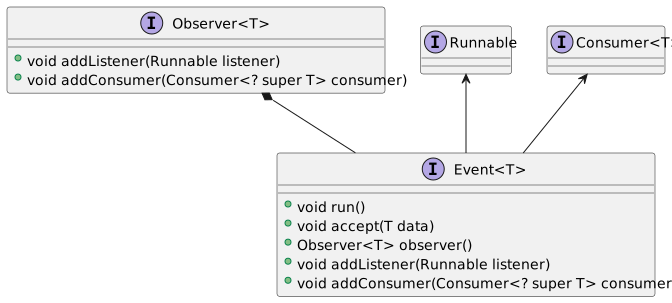
The Event class is a synchronous event implementation used throughout the framework. Classes typically expose observers for their events via public accessors. Events are triggered by calling the run method in case no data is associated with the event or accept in case data should be propogated to consumers.
The associated Observer instance can not trigger the event and can be safely passed around.
Event listeners must implement either Runnable or Consumer, depending on whether they are interested in the data associated with the event.
|
Note
|
Both listeners and consumer are notified each time the event is triggered, regardless of whether run or accept is used, listeners and consumers are notified in the order they were added. |
Events are instantiated via factory methods in the Event class.
// specify an event propagating
// a String as the event data
Event<String> event = Event.event();

// an observer manages the listeners
// for an Event but can not trigger it
Observer<String> observer = event.observer();

// add a listener if you're not
// interested in the event data
observer.addListener(() -> System.out.println("Event occurred"));

event.run();//output: 'Event occurred'

// or a consumer if you're
// interested in the event data
observer.addConsumer(data -> System.out.println("Event: " + data));

event.accept("info");//output: 'Event: info'

// Event implements Observer so
// listeneres can be added directly without
// referring to the Observer
event.addConsumer(System.out::println);
1.2. Observer
The Observer class provides a way to add conditional listeners via Observer.when().
private void observer() {
  // React to a specific value or predicate
  Value<Integer> value = Value.nullable();

  value.when(1)
          .addListener(() -> System.out.println("Value is one"));

  value.when(2)
          .addConsumer(System.out::println);

  value.when(Objects::isNull)
          .addListener(() -> System.out.println("Value is null"));

  value.when(1)
          .addListener(() -> System.out.println("one"));
  value.when(2)
          .addListener(() -> System.out.println("two"));
  value.when(v -> v > 10)
          .addConsumer(v -> System.out.println("Large value: " + v));

  // React to boolean states
  State enabled = State.builder()
          .when(true, () -> System.out.println("Enabled"))
          .when(false, () -> System.out.println("Disabled"))
          .build();
}
1.3. Value
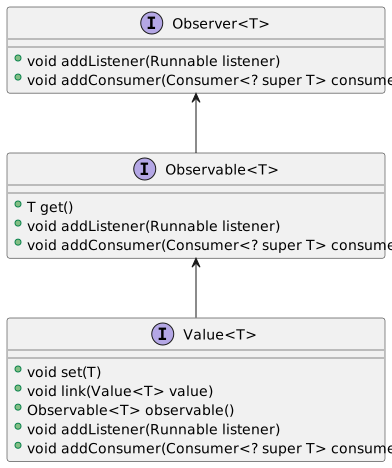
A Value wraps a value and provides a change observer.
Values are instantiated via factory methods in the Value class.
Values can be linked so that changes in one are reflected in the other.
// a nullable value with 2 as the initial value
Value<Integer> value =
        Value.nullable(2);

value.set(4);

// a non-null value using 0 as null substitute
Value<Integer> otherValue =
        Value.nonNull(0);

// linked to the value above
value.link(otherValue);

System.out.println(otherValue.get());// output: 0

otherValue.set(3);

System.out.println(value.get());// output: 3

System.out.println(value.is(3));// output: true

value.set(null);

System.out.println(otherValue.get());// output: 0

value.addConsumer(System.out::println);

otherValue.addListener(() ->
        System.out.println("Value changed: " + otherValue.get()));
Values can be non-nullable if a nullValue is specified when the value is initialized. Null is then translated to the nullValue when set.
Integer initialValue = 42;
Integer nullValue = 0;

Value<Integer> value =
        Value.builder()
                .nonNull(nullValue)
                .value(initialValue)
                .build();

System.out.println(value.isNullable());//output: false

System.out.println(value.get());// output: 42

value.set(null); //or value.clear();

value.isNull(); //output: false;

System.out.println(value.get());//output: 0
1.3.1. Linking
Values of the same type can be linked, instead of synchronizing them manually with listeners. Linking is bidirectional and the current value of the original propagates to the linked value when the link is established. This is the mechanism binding input components to values throughout the framework.
Value<Integer> value = Value.nullable();

Value<Integer> linked = Value.nullable();

// linking propagates the current value
// of the original value to the linked one
linked.link(value);

value.set(2);

System.out.println(linked.get());// output: 2

// linking is bidirectional, so a change
// in either value propagates to the other
linked.set(3);

System.out.println(value.get());// output: 3
1.3.2. Notification strategies
By default, listeners are notified only when a value actually changes (Notify.CHANGED) — setting a value equal to the current one is a no-op. Notify.SET notifies on every set, whether the value changed or not.
// CHANGED, the default: listeners are notified
// only when the value actually changes
Value<Integer> counter = Value.builder()
        .nonNull(0)
        .notify(Value.Notify.CHANGED)
        .build();

counter.addListener(() -> System.out.println("changed"));

counter.set(1);// output: 'changed'
counter.set(1);// no output, value did not change

// SET: listeners are notified each
// time the value is set
Value<Integer> status = Value.builder()
        .nonNull(0)
        .notify(Value.Notify.SET)
        .build();

status.addListener(() -> System.out.println("set"));

status.set(1);// output: 'set'
status.set(1);// output: 'set'
1.3.3. ValueCollection
ValueSet<Integer> valueSet =
        ValueSet.<Integer>builder()
                .value(Set.of(1, 2, 3))
                .build();

valueSet.addListener(() -> System.out.println("Values changed"));

valueSet.add(4); //output: Values changed
valueSet.add(1); //no change, no output

valueSet.remove(1); //output: Values changed
System.out.println(valueSet.contains(1)); //output: false

valueSet.clear();

ValueList<Integer> valueList =
        ValueList.<Integer>builder()
                .value(List.of(1, 2, 3))
                .build();

valueList.addListener(() -> System.out.println("Values changed"));

valueList.add(4); //output: Values changed
valueList.add(1); //output: Values changed

valueList.remove(1); //output: Values changed
System.out.println(valueList.contains(1)); //output: true

valueList.clear();
1.4. State
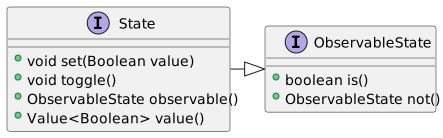
The State class encapsulates a boolean state and provides read only access and a change observer via ObservableState. A State implements Value<Boolean> and is non-nullable with null translating to false.
States are instantiated via factory methods in the State class.
// a boolean state, false by default
State state = State.state();

// an observable manages the listeners for a State but can not modify it
ObservableState observable = state.observable();
// a not observable is always available, which is
// always the reverse of the original state
ObservableState not = state.not();

// add a listener notified each time the state changes
observable.addListener(() -> System.out.println("State changed"));

state.set(true);//output: 'State changed'

observable.addConsumer(value -> System.out.println("State: " + value));

state.set(false);//output: 'State: false'

// State extends ObservableState so listeners can be added
// directly without referring to the ObservableState
state.addListener(() -> System.out.println("State changed"));
private static final class IntegerValue {
private final State negative = State.state(false);
private final Value<Integer> integer = Value.builder()
.nonNull(0)
.consumer(value -> negative.set(value < 0))
.build();
/**
* Increment the value by one
*/
public void increment() {
integer.update(value -> value + 1);
}
/**
* Decrement the value by one
*/
public void decrement() {
integer.update(value -> value - 1);
}
/**
* @return an observer notified each time the value changes
*/
public Observer<Integer> changed() {
return integer.observable();
}
/**
* @return a state observer indicating whether the value is negative
*/
public ObservableState negative() {
return negative.observable();
}
}Any Action or JComponent enabled status can be linked to a State instance via the Utilities.enabled() method.
1.4.1. State composition
State updateEnabled = State.state();
State insertEnabled = State.state();

State recordNew = State.state();
State recordModified = State.state();

ObservableState saveButtonEnabled = State.and(
        State.or(insertEnabled, updateEnabled),
        State.or(recordNew, recordModified));

JButton saveButton = new JButton("Save");

Utilities.enabled(saveButtonEnabled, saveButton);
State state = State.state();
Action action = new AbstractAction("action") {
@Override
public void actionPerformed(ActionEvent e) {
System.out.println("Hello Action");
}
};
Utilities.enabled(state, action);
System.out.println(action.isEnabled());// output: false
state.set(true);
System.out.println(action.isEnabled());// output: trueControls can also be linked to a State instance.
State state = State.state();

CommandControl control = Control.builder()
        .command(() -> System.out.println("Hello Control"))
        .enabled(state)
        .build();

System.out.println(control.isEnabled());// output: false

state.set(true);

System.out.println(control.isEnabled());// output: true|
Note
|
When a State or Event is linked to a Swing component, for example its enabled state, all state changes must happen on the Event Dispatch Thread. |
1.4.2. State groups
A State.Group ensures that at most a single member state is active at a time — radio button semantics:
// a state group ensures that only a single
// state is active at a time, like radio buttons
State one = State.state();
State two = State.state();
State three = State.state();

State.group(one, two, three);

one.set(true);

System.out.println(two.is());// output: false

two.set(true);

System.out.println(one.is());// output: false
2. Weak listeners
Every observer accepts listeners via weak references — addWeakListener(), addWeakConsumer() — which do not prevent the listener from being garbage collected. A short-lived component observing a long-lived model should use a weak listener (or remove its listeners when discarded), otherwise the model keeps the discarded component reachable forever. Dead references are cleaned up automatically; the caller must simply ensure something holds a strong reference to the listener for as long as it should stay active.
Value<Integer> value = Value.nullable();

Runnable listener = () -> System.out.println("Value changed");

// a weak listener does not prevent garbage collection of the
// listener instance; a component observing a model that outlives
// it should use a weak listener, or remove its listeners when discarded.
// Note that something must keep a strong reference to the listener,
// here it is a local variable, so this only works within this scope
value.addWeakListener(listener);

value.set(42);// output: 'Value changed'

// weak references to garbage collected
// listeners are cleaned up automatically
3. Threading
Listener management — adding and removing — is thread-safe on all reactive classes. Mutation and notification are not: set(), run() and accept() are designed to be called from a single thread, the UI thread in a typical application. A background thread with a result for a value hands it to the UI thread first — in Swing via SwingUtilities.invokeLater or, better, a ProgressWorker whose onResult already runs there.
Listeners are notified synchronously, in the order they were added, and an exception thrown by a listener prevents the remaining ones from being notified — listeners performing risky work handle their own exceptions.