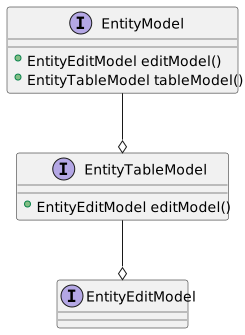
The application model layer consists of the EntityModel class and its associates; the EntityTableModel, which provides a table representation of entities and the EntityEditModel which provides the CRUD operations.
An EntityModel always contains an EntityEditModel instance and usually contains a EntityTableModel as well. A default edit model implementation is created automatically by the EntityTableModel if one is not supplied via a constructor argument.
public class AddressModel extends SwingEntityModel {

  public AddressModel(EntityConnection connection) {
    super(Address.TYPE, connection);
  }
}
public class CustomerAddressModel extends SwingEntityModel {
public CustomerAddressModel(EntityConnection connection) {
super(new CustomerAddressTableModel(connection));
}
}1. Detail models
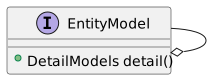
An EntityModel can contain one or more detail models, usually based on foreign key relationships.
public class StoreApplicationModel extends SwingEntityApplicationModel {

  public StoreApplicationModel(EntityConnection connection) {
    super(connection, List.of(createCustomerModel(connection)));
  }

  private static SwingEntityModel createCustomerModel(EntityConnection connection) {
    CustomerModel customerModel =
            new CustomerModel(connection);
    CustomerAddressModel customerAddressModel =
            new CustomerAddressModel(connection);

    customerModel.detail().add(customerAddressModel);

    //populate the model with rows from the database
    customerModel.tableModel().items().refresh();

    return customerModel;
  }
}
2. Event binding
The model layer classes expose a number of Event, State and Value observers.
private void bindEvents() {
  CustomerTableModel tableModel = (CustomerTableModel) tableModel();

  tableModel.selection().items()
          .addConsumer(selected ->
                  System.out.println("Items selected: " + selected));

  tableModel.items().refresher().result()
          .addListener(() -> System.out.println("Refresh successful"));

  CustomerEditModel editModel = (CustomerEditModel) editModel();

  editModel.editor().events().after().insert()
          .addConsumer(inserted ->
                  System.out.println("Entities inserted" + inserted));

  editModel.editor().value(Customer.FIRST_NAME).edited()
          .addConsumer(firstName ->
                  System.out.println("First name changed to " + firstName));
}