1. Framework Model Architecture
The model layer is a complete, UI-independent application: data retrieval, editing, validation, selection, master-detail coordination and all associated state live here, exposed through the framework’s reactive classes. The UI layer renders models — it does not extend them with logic. Nothing in the model layer depends on a UI toolkit, which has two practical consequences: application logic is unit-testable without showing a window, and the same models can drive different client technologies.
1.1. The pieces
An EntityModel is the composition root for a single entity type: an edit model (wrapping the editor — the write path), usually a table model (with its query model — the read path), and any detail models.
    SwingEntityModel customerModel = new SwingEntityModel(Customer.TYPE, connectionProvider);
    SwingEntityModel invoiceModel = new SwingEntityModel(Invoice.TYPE, connectionProvider);

    // Establish master-detail relationship
    customerModel.detail().add(invoiceModel);
Master-detail relationships are expressed by linking models, to arbitrary depth — a detail model’s query condition tracks its master’s selection automatically:
    // Three-level hierarchy
    SwingEntityModel customerModel = new SwingEntityModel(Customer.TYPE, connectionProvider);
    SwingEntityModel invoiceModel = new SwingEntityModel(Invoice.TYPE, connectionProvider);
    SwingEntityModel invoiceLineModel = new SwingEntityModel(InvoiceLine.TYPE, connectionProvider);

    customerModel.detail().add(invoiceModel);
    invoiceModel.detail().add(invoiceLineModel);

    // Selection cascades down the hierarchy
    Entity customer = getCustomer(connectionProvider);
    customerModel.tableModel().selection().item().set(customer);
    // Invoices for selected customer are loaded
    Entity invoice = invoiceModel.tableModel().items().included().get(0);
    invoiceModel.tableModel().selection().item().set(invoice);
    // Invoice lines for selected invoice are loaded
See Model linking for the linking configuration — what happens on selection, insert, update and delete.
1.2. The reactive fabric
Everything a model knows is exposed as an observable Value, State or Event — which is all a UI needs to render it, and all application logic needs to react to it:
    SwingEntityModel customerModel = new SwingEntityModel(Customer.TYPE, connectionProvider);
    SwingEntityEditModel editModel = customerModel.editModel();
    SwingEntityTableModel tableModel = customerModel.tableModel();

    // Edit model states
    State updateEnabled = editModel.editor().settings().updateEnabled();
    State updateMultipleEnabled = editModel.editor().settings().updateMultipleEnabled();
    ObservableState modified = editModel.editor().entity().modified();

    // Table model states
    ObservableState refreshing = tableModel.items().refresher().active();
    ObservableState hasSelection = tableModel.selection().empty().not();

    // Combine states
    ObservableState canDelete = State.and(hasSelection, refreshing.not());
Entity values are observable per attribute, so values can be bound — to input components, or across models:
    SwingEntityModel trackModel = new SwingEntityModel(Track.TYPE, connectionProvider);
    SwingEntityEditModel editModel = trackModel.editModel();

    // Bind edit model value to UI state
    EditorValue<BigDecimal> priceValue = editModel.editor().value(Track.UNITPRICE);
    ObservableState priceValid = editModel.editor().value(Track.UNITPRICE).valid();

    // React to value changes
    priceValue.addConsumer(this::updateTotalPrice);

    // React to value edits
    priceValue.edited().addConsumer(newPrice -> System.out.println("Price: " + newPrice));
    priceValid.when(false)
            .addListener(() -> System.out.println("Invalid price: " + priceValue.get()));
1.3. Where application logic belongs
Logic belongs in the models — reacting to edits, persistence events and selection there means it works the same regardless of which UI (or test) drives it:
    SwingEntityModel invoiceLineModel = new SwingEntityModel(InvoiceLine.TYPE, connectionProvider);

    // Update summary when details change
    PersistEvents events = invoiceLineModel.editor().events();
    events.after().insert().addConsumer(entities -> updateInvoiceTotal());
    events.after().update().addConsumer(entities -> updateInvoiceTotal());
    events.after().delete().addConsumer(entities -> updateInvoiceTotal());
The chinook demo’s models are the reference examples: value dependencies and custom persistence in InvoiceLineEditModel, value propagation in InvoiceEditModel, selection-scoped operations in TrackTableModel — each documented in the chapters that follow.
|
Note
|
Since models are UI-free, they are constructed and exercised directly in unit tests — create the model with a test connection provider, edit, insert, assert. |
2. EntityModel
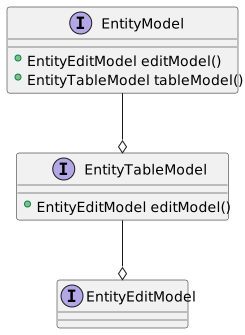
The application model layer consists of the EntityModel class and its associates; the EntityTableModel, which provides a table representation of entities and the EntityEditModel which provides the CRUD operations.
An EntityModel always contains an EntityEditModel instance and usually contains a EntityTableModel as well. A default edit model implementation is created automatically by the EntityTableModel if one is not supplied via a constructor argument.
public class AddressModel extends SwingEntityModel {

  public AddressModel(EntityConnectionProvider connectionProvider) {
    super(Address.TYPE, connectionProvider);
  }
}
public class CustomerAddressModel extends SwingEntityModel {
public CustomerAddressModel(EntityConnectionProvider connectionProvider) {
super(new CustomerAddressTableModel(connectionProvider));
}
}2.1. Detail models
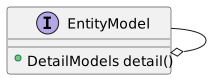
An EntityModel can contain one or more detail models, usually based on foreign key relationships.
public class StoreApplicationModel extends SwingEntityApplicationModel {

  public StoreApplicationModel(EntityConnectionProvider connectionProvider) {
    super(connectionProvider, List.of(createCustomerModel(connectionProvider)));
  }

  private static SwingEntityModel createCustomerModel(EntityConnectionProvider connectionProvider) {
    CustomerModel customerModel =
            new CustomerModel(connectionProvider);
    CustomerAddressModel customerAddressModel =
            new CustomerAddressModel(connectionProvider);

    customerModel.detail().add(customerAddressModel);

    //populate the model with rows from the database
    customerModel.tableModel().items().refresh();

    return customerModel;
  }
}
2.2. Event binding
The model layer classes expose a number of Event, State and Value observers.
private void bindEvents() {
  CustomerTableModel tableModel = (CustomerTableModel) tableModel();

  tableModel.selection().items()
          .addConsumer(selected ->
                  System.out.println("Items selected: " + selected));

  tableModel.items().refresher().result()
          .addListener(() -> System.out.println("Refresh successful"));

  CustomerEditModel editModel = (CustomerEditModel) editModel();

  editModel.editor().events().after().insert()
          .addConsumer(inserted ->
                  System.out.println("Entities inserted" + inserted));

  editModel.editor().value(Customer.FIRST_NAME).edited()
          .addConsumer(firstName ->
                  System.out.println("First name changed to " + firstName));
}3. EntityEditModel
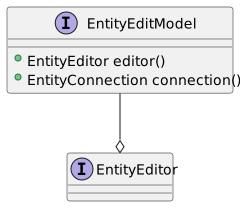
The EntityEditModel binds an EntityEditor to a connection, and is the model an EntityEditPanel is based on. The editing itself — values, validation, dirty state, insert, update and delete — is the EntityEditor's job, accessed via editor().
The simplest edit model requires nothing but a constructor:
public class CustomerEditModel extends SwingEntityEditModel {

  public CustomerEditModel(EntityConnectionProvider connectionProvider) {
    super(Customer.TYPE, connectionProvider);
  }
}
Application logic belongs in the edit model (or its editor), not in the UI: default values, value dependencies and custom persistence configured here work identically whether the entity is edited through an edit panel, a table or a dialog.
public final class InvoiceEditModel extends SwingEntityEditModel {

  public InvoiceEditModel(EntityConnectionProvider connectionProvider) {
    super(Invoice.TYPE, connectionProvider);
    EditorValue<Entity> customer = editor().value(Invoice.CUSTOMER_FK);
    // By default, foreign key values persist when the model
    // is cleared, here we disable that for CUSTOMER_FK
    customer.persist().set(false);
    // We populate the invoice address fields with
    // the customer address when the customer is edited
    customer.propagate(Invoice.BILLINGADDRESS, cust -> valueOrNull(cust, Customer.ADDRESS));
    customer.propagate(Invoice.BILLINGCITY, cust -> valueOrNull(cust, Customer.CITY));
    customer.propagate(Invoice.BILLINGPOSTALCODE, cust -> valueOrNull(cust, Customer.POSTALCODE));
    customer.propagate(Invoice.BILLINGSTATE, cust -> valueOrNull(cust, Customer.STATE));
    customer.propagate(Invoice.BILLINGCOUNTRY, cust -> valueOrNull(cust, Customer.COUNTRY));
  }

  private static @Nullable <T> T valueOrNull(Entity customer, Attribute<T> attribute) {
    return customer == null ? null : customer.get(attribute);
  }
}
See EntityEditor for the editor API this builds on: editing values, default values, value propagation, custom persistence and detail editors.
3.1. Combo box models
The Swing implementation, SwingEntityEditModel, provides combo box models for foreign keys and column values, shared by the input components bound to them. A combo box model can be initialized eagerly in the constructor — otherwise it is created and refreshed on first use, by the component requesting it.
public final class TrackEditModel extends SwingEntityEditModel {

  public TrackEditModel(EntityConnectionProvider connectionProvider) {
    super(Track.TYPE, connectionProvider);
    // Creates and populates the combo box models for the given foreign keys, otherwise this
    // would happen when the associated combo boxes are created, as the UI is initialized.
    editor().comboBoxModels().initialize(Track.MEDIATYPE_FK, Track.GENRE_FK);
  }
}
Combo box models based on entities stay consistent automatically: entities inserted, updated or deleted elsewhere in the application are added to, replaced in or removed from the combo box model, via the editor’s insert, update and delete events.
4. EntityEditor
The EntityEditor is the framework’s write path: it manages a single entity instance being edited — its values, their validity, dirty state and default values — and performs the insert, update and delete operations. An editor is available from every edit model via editor(), and everything an EntityEditPanel does — component enabling, validation indicators, dirty warnings — it does by observing the editor.
The editor exposes two things: the entity being edited, via entity(), and an observable value for each attribute, via value(attribute).
4.1. The entity
EditorEntity represents the entity being edited: set() populates the editor, defaults() initializes a new entity with default values, clear() empties it, revert() reverts all modifications. Its exists(), modified() and valid() observable states drive the UI — an insert control is enabled while the entity does not exist, an update control while it exists and is modified and valid.
The example below shows the full life cycle: defaults, setting values, insert, modify, update and delete.
EntityConnectionProvider connectionProvider =
        EntityConnectionProvider.builder()
                .domain(Store.DOMAIN)
                .user(User.parse("scott:tiger"))
                .clientType("StoreMisc")
                .build();

CustomerEditModel editModel = new CustomerEditModel(connectionProvider);

SwingEntityEditor editor = editModel.editor();
editor.value(Customer.ID).defaultValue()
        .set(() -> UUID.randomUUID().toString());

//sets the defaults
editor.entity().defaults();
//set the values
editor.value(Customer.FIRST_NAME).set("Björn");
editor.value(Customer.LAST_NAME).set("Sigurðsson");
editor.value(Customer.ACTIVE).set(true);

//inserts and returns the inserted entity
Entity customer = editor.insert();

//modify some values
editor.value(Customer.FIRST_NAME).set("John");
editor.value(Customer.LAST_NAME).set("Doe");

//updates and returns the updated entity
customer = editor.update();

//deletes the active entity
editor.delete();
4.2. Editing values
EditorValue is a full Value implementation for a single attribute, so anything that can be linked to a Value — an input component, another value — can be linked to an attribute of the entity being edited. Each editor value also exposes the state the UI needs: valid() and modified() observable states, a validation message(), the original() value and revert().
Two observers notify of changes, with an important distinction:
-
Value.observer() — notified whenever the value changes, whether by the user or by the framework populating the editor.
-
edited() — notified only when the value is changed through this EditorValue, that is, by an actual edit, not when the entity is set or cleared.
Use edited() to react to user edits without also reacting every time an entity is selected into the editor:
// We populate the unit price when the track is edited
Observer<Entity> trackEdited = editor().value(InvoiceLine.TRACK_FK).edited();
trackEdited.when(Objects::nonNull)
        .addConsumer(this::setUnitPrice);
trackEdited.when(Objects::isNull)
        .addListener(this::clearUnitPrice);
4.3. Default values and persistent values
Each editor value has a defaultValue() supplier, used by entity().defaults() when initializing a new entity. A default value can be configured in the domain model, via the attribute definition, or set on the editor value directly, as in the UUID example in the previous section.
The persist() state controls whether a value survives defaults() — whether it carries over from one entity to the next. Foreign key values persist by default, since when entering a batch of records the reference typically stays the same, while the other values change.
4.4. Foreign key values: persist and propagate
The example below disables persistence for a foreign key and uses propagate() to populate the invoice billing address from the customer, each time the customer is edited. A propagated value is applied only when the source value actually changes and remains editable by the user afterwards.
public final class InvoiceEditModel extends SwingEntityEditModel {

  public InvoiceEditModel(EntityConnectionProvider connectionProvider) {
    super(Invoice.TYPE, connectionProvider);
    EditorValue<Entity> customer = editor().value(Invoice.CUSTOMER_FK);
    // By default, foreign key values persist when the model
    // is cleared, here we disable that for CUSTOMER_FK
    customer.persist().set(false);
    // We populate the invoice address fields with
    // the customer address when the customer is edited
    customer.propagate(Invoice.BILLINGADDRESS, cust -> valueOrNull(cust, Customer.ADDRESS));
    customer.propagate(Invoice.BILLINGCITY, cust -> valueOrNull(cust, Customer.CITY));
    customer.propagate(Invoice.BILLINGPOSTALCODE, cust -> valueOrNull(cust, Customer.POSTALCODE));
    customer.propagate(Invoice.BILLINGSTATE, cust -> valueOrNull(cust, Customer.STATE));
    customer.propagate(Invoice.BILLINGCOUNTRY, cust -> valueOrNull(cust, Customer.COUNTRY));
  }

  private static @Nullable <T> T valueOrNull(Entity customer, Attribute<T> attribute) {
    return customer == null ? null : customer.get(attribute);
  }
}
4.5. Inserting, updating and deleting
insert(), update() and delete() operate on the entity being edited and return the resulting entity (or entities, for the collection variants). The entity is validated before insert and update, using the validator(), and an invalid entity fails with an EntityValidationException — the same validation continuously reflected by the valid() states and message() of each editor value.
|
Note
|
These methods perform the operation on the calling thread. UI code, such as EntityEditPanel, uses tasks() to prepare an operation for background execution, keeping the UI responsive. |
4.6. Custom persistence
EntityPersistence, set via persistence(), replaces how the editor performs its insert, update and delete — without changing anything else about it. Here invoice line operations run in a transaction which also updates the totals of the affected invoices, via a database procedure:
private static final class InvoiceLinePersistence implements EntityPersistence {

  @Override
  public Collection<Entity> insert(Collection<Entity> invoiceLines, EntityConnection connection) {
    // Use a transaction to update the invoice totals when an invoice line is inserted
    return transaction(connection, () -> updateTotals(connection.insertSelect(invoiceLines), connection));
  }

  @Override
  public Collection<Entity> update(Collection<Entity> invoiceLines, EntityConnection connection) {
    // Use a transaction to update the invoice totals when an invoice line is updated
    return transaction(connection, () -> updateTotals(connection.updateSelect(invoiceLines), connection));
  }

  @Override
  public void delete(Collection<Entity> invoiceLines, EntityConnection connection) {
    // Use a transaction to update the invoice totals when an invoice line is deleted
    transaction(connection, () -> {
      connection.delete(primaryKeys(invoiceLines));
      updateTotals(invoiceLines, connection);
    });
  }

  private static Collection<Entity> updateTotals(Collection<Entity> invoiceLines, EntityConnection connection) {
    // Get the IDs of the invoices that need their totals updated
    Collection<Long> invoiceIds = distinct(InvoiceLine.INVOICE_ID, invoiceLines);
    // Execute the UPDATE_TOTALS procedure
    connection.execute(Invoice.UPDATE_TOTALS, invoiceIds);

    return invoiceLines;
  }
}
4.7. Detail editors
An editor can edit related entities alongside its own, via detail() and EditorLink. A detail editor is populated when the master entity is set, and its entity is inserted, updated or deleted along with the master, in the same transaction. The link’s present predicate decides whether the detail entity should exist at all — a detail entity failing the predicate is deleted rather than saved.
Here customer preferences are edited alongside the customer:
public final class CustomerEditModel extends SwingEntityEditModel {

  public CustomerEditModel(EntityConnectionProvider connectionProvider) {
    super(Customer.TYPE, connectionProvider);
    editor().comboBoxModels().initialize(Customer.SUPPORTREP_FK);
    // Set a detail editor, in order to edit customer preferences alongside the customer
    SwingEntityEditor preferences = new SwingEntityEditor(Preferences.TYPE, connectionProvider);
    preferences.value(Preferences.PREFERRED_GENRE_FK).persist().set(false);
    preferences.comboBoxModels().initialize(Preferences.PREFERRED_GENRE_FK);
    editor().detail().add(EditorLink.builder()
            .editor(preferences)
            .foreignKey(Preferences.CUSTOMER_FK)
            .select(customer -> where(Preferences.CUSTOMER_FK.equalTo(customer))
                    .referenceDepth(Preferences.CUSTOMER_FK, 0)
                    .build())
            .present(new PreferencesPresent())
            .build());
  }

  private static final class PreferencesPresent implements Predicate<Entity> {

    @Override
    public boolean test(Entity preferences) {
      // Preferences without both preferred genre and newsletter are deleted
      return preferences.present(Preferences.PREFERRED_GENRE_FK) ||
              preferences.present(Preferences.NEWSLETTER);
    }
  }
}
The link’s select provides the query fetching the detail entity for a given master, which the artist editor below uses to edit a fixed number of tag entities, one link per tag slot:
public final class ArtistEditModel extends SwingEntityEditModel {

  public static final int TAG_SLOTS = 6;
  public static final String TAG_PREFIX = "tag";

  public ArtistEditModel(EntityConnectionProvider connectionProvider) {
    super(Artist.TYPE, connectionProvider);
    TagPresent present = new TagPresent();
    for (int i = 0; i < TAG_SLOTS; i++) {
      editor().detail().add(EditorLink.builder()
              .editor(new SwingEntityEditor(ArtistTag.TYPE, connectionProvider))
              .foreignKey(ArtistTag.ARTIST_FK)
              .select(new TagSelect(i))
              .present(present)
              .name(TAG_PREFIX + i)
              .caption(String.valueOf(i + 1))
              .build());
    }
  }

  private static final class TagSelect implements DetailSelect {

    private final int index;

    private TagSelect(int index) {
      this.index = index;
    }

    @Override
    public Select get(Entity artist) {
      return Select.where(ArtistTag.ARTIST_FK.equalTo(artist))
              .orderBy(ascending(ArtistTag.TAG))
              .referenceDepth(0)
              .offset(index)
              .limit(1)
              .build();
    }
  }

  private static final class TagPresent implements Predicate<Entity> {

    @Override
    public boolean test(Entity tag) {
      return tag.present(ArtistTag.TAG);
    }
  }
}
4.8. Events
events() provides application-wide insert, update and delete notifications for the edited entity type. These are what keep the rest of a running application consistent without any wiring: combo box models refresh or reconcile, search model selections receive updated instances, table models react to insert and delete, and foreign key values in other editors are replaced when the entity they reference is updated or deleted elsewhere. Reach for these events when application logic must react to persistence outcomes regardless of which editor performed the operation.
5. EntityTableModel
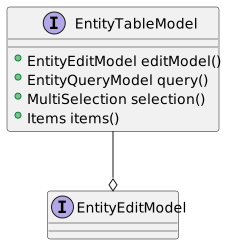
The EntityTableModel provides a table representation of entities: the items fetched by its EntityQueryModel, a selection and an editModel for editing them.
Every EntityTableModel contains an EntityEditModel instance — a default one is created automatically unless one is supplied via a constructor argument.
public class CustomerTableModel extends SwingEntityTableModel {

  public CustomerTableModel(EntityConnectionProvider connectionProvider) {
    super(new CustomerEditModel(connectionProvider));
  }
}
public class CustomerAddressTableModel extends SwingEntityTableModel {
public CustomerAddressTableModel(EntityConnectionProvider connectionProvider) {
super(CustomerAddress.TYPE, connectionProvider);
}
}5.1. Items, selection and query
items().refresh() populates the table by running the query model's query — the condition, attributes, order by and limit it is configured with. selection() provides the selected items and indexes as observable values, which is what selection-scoped controls bind their enabled state to, and what master models propagate to their detail models.
When entities of the table’s type are inserted, updated or deleted anywhere in the application, the table model reacts: updated rows are replaced in place, deleted rows removed, and inserted entities added according to the onInsert() strategy — prepended by default, appended, or ignored.
5.2. Application logic
Operations on the selected rows belong in the table model, keeping the UI layer free of business logic. Here a database function raises the price of the selected tracks, and the updated entities are reconciled back into the table with replace():
public final class RaisePriceTask implements ResultTaskHandler<Collection<Entity>> {

  private final BigDecimal increase;

  private RaisePriceTask(BigDecimal increase) {
    this.increase = increase;
  }

  @Override
  public Collection<Entity> execute() throws Exception {
    Collection<Long> trackIds = Entity.values(Track.ID, selection().items().get());

    return connection().execute(Track.RAISE_PRICE, new RaisePriceParameters(trackIds, increase));
  }

  @Override
  public void onResult(Collection<Entity> result) {
    replace(result);
  }
}
The task above is a ResultTaskHandler, prepared by the model and executed by the UI on a background thread, with the result applied on the UI thread.
Functions returning new entities follow the same pattern — here wrapped in a transaction:
public Entity createRandomPlaylist(RandomPlaylistParameters parameters) {
  EntityConnection connection = connection();

  return transaction(connection, () -> connection.execute(Playlist.RANDOM_PLAYLIST, parameters));
}
6. EntityQueryModel
The EntityQueryModel manages how entities are fetched from the database for table models. It provides fine-grained control over query conditions, result limits, ordering, and custom data sources.
6.1. Overview
EntityQueryModel acts as the data retrieval engine for EntityTableModel, encapsulating:
-
Query conditions (WHERE and HAVING clauses)
-
Result limits to prevent excessive data loading
-
Custom ordering specifications
-
Attribute selection for optimization
-
Custom data sources for specialized queries
    SwingEntityModel customerModel = new SwingEntityModel(Customer.TYPE, connectionProvider);
    SwingEntityTableModel tableModel = customerModel.tableModel();
    EntityQueryModel query = tableModel.query();

    // Configure query behavior
    query.limit().set(200);
    query.conditionRequired().set(true);
    query.orderBy().set(OrderBy.ascending(Customer.LASTNAME));
6.2. Condition Management
6.2.1. Entity Condition Model
The primary condition mechanism is the EntityConditionModel, which provides a flexible way to build complex queries:
    SwingEntityModel customerModel = new SwingEntityModel(Customer.TYPE, connectionProvider);
    EntityConditionModel condition = customerModel.tableModel().query().condition();

    // Set condition values
    condition.get(Customer.EMAIL).set().isNotNull();
    condition.get(Customer.COUNTRY).set().equalTo("Iceland");

    // The resulting query will include:
    // WHERE email is not null AND country = 'Iceland'
6.2.2. Additional Conditions
Beyond the table condition model, you can add custom WHERE and/or HAVING conditions:
    SwingEntityModel customerModel = new SwingEntityModel(Customer.TYPE, connectionProvider);
    AdditionalConditions additional = customerModel.tableModel().query().condition().additional();

    // Single additional condition
    additional.where().set(() -> Customer.COUNTRY.equalTo("Iceland"));

    // Multiple conditions with custom conjunction
    additional.where().set(() -> Condition.or(
            Customer.CITY.equalTo("Reykjavik"),
            Customer.CITY.equalTo("Akureyri")
    ));
6.3. Query Limits
Prevent loading excessive data by setting query limits:
    SwingEntityModel customerModel = new SwingEntityModel(Customer.TYPE, connectionProvider);
    EntityQueryModel query = customerModel.tableModel().query();

    // Set a specific limit
    query.limit().set(500);

    // Resets to the default limit specified by the
    // EntityQueryModel.LIMIT configuration setting,
    // if one is specified, otherwise clears the
    // limit and allows fetching of all matching rows
    query.limit().clear();

    // Add a max limit validator
    query.limit().addValidator(newLimit -> {
      if (newLimit > 10.000) {
        throw new IllegalArgumentException("Limit may not exceed 10.000");
      }
    });

    // Listen for limit changes
    query.limit().addConsumer(newLimit ->
            System.out.println("Query limit changed to: " + newLimit));
6.4. Result Ordering
Specify how results should be ordered:
    SwingEntityModel invoiceModel = new SwingEntityModel(Invoice.TYPE, connectionProvider);
    EntityQueryModel query = invoiceModel.tableModel().query();

    // Single column ordering
    query.orderBy().set(OrderBy.descending(Invoice.DATE));

    // Multiple columns
    query.orderBy().set(OrderBy.builder()
            .ascending(Invoice.BILLINGCOUNTRY)
            .descending(Invoice.DATE)
            .build()
    );
6.5. Custom Data Sources
For complex queries that can’t be expressed through conditions, provide a custom data source:
    SwingEntityModel customerModel = new SwingEntityModel(Customer.TYPE, connectionProvider);

    customerModel.tableModel().query().dataSource().set(query -> {
      EntityConnection connection = query.connectionProvider().connection();

      // Custom query with complex joins or database-specific features
      return connection.select(Select.where(customComplexCondition())
              .attributes(Customer.ADDRESS, Customer.CITY, Customer.COUNTRY));
    });
6.6. Condition Required
Prevent accidental full table scans:
    SwingEntityModel customerModel = new SwingEntityModel(Customer.TYPE, connectionProvider);
    EntityQueryModel query = customerModel.tableModel().query();

    // Require at least one condition
    query.conditionRequired().set(true);

    // Specify that a certain condition must be enabled
    query.conditionEnabled().set(query.condition().get(Customer.SUPPORTREP_FK).enabled());
6.7. Attribute Management
Optimize queries by selecting only needed attributes:
    SwingEntityModel albumModel = new SwingEntityModel(Album.TYPE, connectionProvider);
    EntityQueryModel query = albumModel.tableModel().query();

    // Exclude large columns by default
    query.attributes().exclude().add(Album.COVER);

    // Include them only when needed
    State detailView = State.state();
    detailView.addConsumer(showDetails -> {
      if (showDetails) {
        query.attributes().exclude().remove(Album.COVER);
      }
      else {
        query.attributes().exclude().add(Album.COVER);
      }
    });
7. EntitySearchModel
The EntitySearchModel is the model component underlying the EntitySearchField UI component. It provides entity search functionality with support for multi-column text searching and entity selection.
7.1. Overview
EntitySearchModel provides:
-
Multi-column text searching with configurable wildcards
-
Single or multi-entity selection management
-
Result limiting to prevent excessive data retrieval
-
Case-sensitive or insensitive search options
-
The model component for
EntitySearchFieldUI component -
Automatic updates when entities are modified
    EntitySearchModel searchModel = EntitySearchModel.builder()
            .entityType(Customer.TYPE)
            .connectionProvider(connectionProvider)
            .search(Customer.FIRSTNAME, Customer.LASTNAME, Customer.EMAIL)
            .limit(50)
            .build();

    // Perform search
    searchModel.condition().set(() -> Customer.FIRSTNAME.equalTo("john"));

    // Get search result
    List<Entity> result = searchModel.search().perform();
7.2. Search Configuration
7.2.1. Search Settings
Configure search behavior per column:
    EntitySearchModel searchModel = EntitySearchModel.builder()
            .entityType(Customer.TYPE)
            .connectionProvider(connectionProvider)
            .search(Customer.FIRSTNAME, Customer.LASTNAME)
            .build();

    // Get settings for a specific column
    EntitySearchModel.Settings settings = searchModel.settings().get(Customer.LASTNAME);

    // Add wildcards automatically
    settings.wildcardPrefix().set(true);   // Adds % before search text
    settings.wildcardPostfix().set(true);  // Adds % after search text

    // Replace spaces with wildcards
    settings.spaceAsWildcard().set(true);  // "john smith" → "john%smith"

    // Case sensitivity
    settings.caseSensitive().set(false);   // Case-insensitive search
7.2.2. Wildcard Strategies
The search model supports different wildcard configurations:
-
Prefix search (autocomplete style):
wildcardPrefix(false),wildcardPostfix(true)- "joh" → "joh%" -
Contains search:
wildcardPrefix(true),wildcardPostfix(true)- "ohn" → "%ohn%" -
Exact search:
wildcardPrefix(false),wildcardPostfix(false)- "john" → "john" -
Multi-word search:
spaceAsWildcard(true)- "john reyk" → "%john%reyk%"
7.3. Selection Management
7.3.1. Single Selection Mode
For selecting one entity at a time:
    EntitySearchModel searchModel = EntitySearchModel.builder()
            .entityType(Album.TYPE)
            .connectionProvider(connectionProvider)
            .search(Album.TITLE)
            .build();

    // Set selection programmatically
    Entity album = getAlbum(connectionProvider);
    searchModel.selection().entity().set(album);

    // React to selection changes
    searchModel.selection().entity().addConsumer(selectedAlbum -> {
      if (selectedAlbum != null) {
        displayAlbumDetails(selectedAlbum);
      }
    });

    // Clear selection
    searchModel.selection().clear();
7.3.2. Multi-Selection Mode
For selecting multiple entities:
    EntitySearchModel searchModel = EntitySearchModel.builder()
            .entityType(Track.TYPE)
            .connectionProvider(connectionProvider)
            .search(Track.NAME)
            .build();

    // Get all selected entities
    Collection<Entity> selectedTracks = searchModel.selection().entities().get();

    // Add to selection
    Entity track = getTrack(connectionProvider);
    searchModel.selection().entities().add(track);

    // Remove from selection
    searchModel.selection().entities().remove(track);

    // Replace entire selection
    searchModel.selection().entities().set(List.of(track));
7.4. Configuration Properties
| Property | Default | Description |
|---|---|---|
|
true |
Whether search models react to entity persistence events |
|
100 |
Default result limit for search models |
|
false |
Default wildcard prefix setting |
|
true |
Default wildcard postfix setting |
|
false |
Default space replacement setting |
|
false |
Default case sensitivity setting |
8. Model Linking
Model linking provides the mechanism for establishing master-detail relationships between entity models. The framework automatically synchronizes detail models based on master model selection and data changes.
8.1. Overview
The ModelLink API enables automatic detail model filtering based on master selection and propagation of data changes.
    // Invoice -> InvoiceLines
    SwingEntityModel invoiceModel = new SwingEntityModel(Invoice.TYPE, connectionProvider);
    SwingEntityModel invoiceLineModel = new SwingEntityModel(InvoiceLine.TYPE, connectionProvider);

    invoiceModel.detail().add(invoiceLineModel);

    // Configure detail model for optimal performance
    invoiceLineModel.tableModel().query().conditionRequired().set(true); // Don't load all lines
    invoiceLineModel.tableModel().query().limit().set(1000); // Reasonable limit
8.2. Building Custom Links
Create links with specific behavior:
    SwingEntityModel customerModel = new SwingEntityModel(Customer.TYPE, connectionProvider);
    SwingEntityModel invoiceModel = new SwingEntityModel(Invoice.TYPE, connectionProvider);

    ModelLink customLink =
            ForeignKeyModelLink.builder()
                    .model(invoiceModel)
                    .foreignKey(Invoice.CUSTOMER_FK)
                    .active(true)
                    .onSelection(selectedCustomers -> {
                      // Custom selection logic
                      if (selectedCustomers.size() > 1) {
                        // Handle multi-selection differently
                        invoiceModel.tableModel().query().condition().clear();
                        invoiceModel.tableModel().query().condition().additional().where().set(() ->
                                Invoice.CUSTOMER_FK.in(selectedCustomers)
                        );
                      }
                    })
                    .build();

    customerModel.detail().add(customLink);
8.3. Automatic Foreign Key Management
The ForeignKeyModelLink specializes ModelLink for foreign key relationships:
    SwingEntityModel customerModel = new SwingEntityModel(Customer.TYPE, connectionProvider);
    SwingEntityModel invoiceModel = new SwingEntityModel(Invoice.TYPE, connectionProvider);

    // ForeignKeyModelLink is created automatically when foreign key is detected
    customerModel.detail().add(invoiceModel);

    // Or configure explicitly
    customerModel.detail().add(ForeignKeyModelLink.builder()
            .model(invoiceModel)
            .foreignKey(Invoice.CUSTOMER_FK)
            // Clear foreign key value when master has no selection
            .clearValueOnEmptySelection(true)
            // Set foreign key value automatically on insert
            .setValueOnInsert(true)
            // Control when to refresh detail data
            .refreshOnSelection(true)
            // Set search condition based on master insert
            .setConditionOnInsert(true)
            .build());
8.4. Simple One-to-Many
Classic master-detail relationship:
    // Invoice -> InvoiceLines
    SwingEntityModel invoiceModel = new SwingEntityModel(Invoice.TYPE, connectionProvider);
    SwingEntityModel invoiceLineModel = new SwingEntityModel(InvoiceLine.TYPE, connectionProvider);

    invoiceModel.detail().add(invoiceLineModel);

    // Configure detail model for optimal performance
    invoiceLineModel.tableModel().query().conditionRequired().set(true); // Don't load all lines
    invoiceLineModel.tableModel().query().limit().set(1000); // Reasonable limit
8.5. Multi-Level Hierarchy
Deep master-detail chains:
    // Customer -> Invoice -> InvoiceLine
    SwingEntityModel customerModel = new SwingEntityModel(Customer.TYPE, connectionProvider);
    SwingEntityModel invoiceModel = new SwingEntityModel(Invoice.TYPE, connectionProvider);
    SwingEntityModel invoiceLineModel = new SwingEntityModel(InvoiceLine.TYPE, connectionProvider);

    // Build hierarchy
    customerModel.detail().add(invoiceModel);
    invoiceModel.detail().add(invoiceLineModel);

    // Configure each level
    invoiceModel.tableModel().query().conditionRequired().set(true);
    invoiceLineModel.tableModel().query().conditionRequired().set(true);

    // Selection cascades down the hierarchy automatically
    Entity customer = getCustomer(connectionProvider);
    customerModel.tableModel().selection().item().set(customer);
    // Invoices for customer are loaded
    // When an invoice is selected, its lines are loaded
    invoiceModel.tableModel().selection().indexes().increment();// selects first
9. EntityApplicationModel
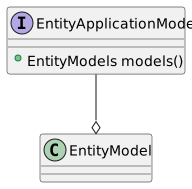
The EntityApplicationModel class serves as the base for the application. Its main purpose is to hold references to the root EntityModel instances used by the application.
When extending this class you must provide a constructor with a single EntityConnectionProvider parameter, as seen below.
public class StoreApplicationModel extends SwingEntityApplicationModel {

  public StoreApplicationModel(EntityConnectionProvider connectionProvider) {
    super(connectionProvider, List.of(createCustomerModel(connectionProvider)));
  }

  private static SwingEntityModel createCustomerModel(EntityConnectionProvider connectionProvider) {
    CustomerModel customerModel =
            new CustomerModel(connectionProvider);
    CustomerAddressModel customerAddressModel =
            new CustomerAddressModel(connectionProvider);

    customerModel.detail().add(customerAddressModel);

    //populate the model with rows from the database
    customerModel.tableModel().items().refresh();

    return customerModel;
  }
}
10. Application load testing
The application load testing harness is used to see how your application, server and database handle multiple concurrent users.
This is done by using the LoadTestModel and LoadTestPanel classes as shown below.
public class StoreLoadTest {

  private static final class StoreApplicationModelFactory
          implements Function<User, StoreApplicationModel> {

    @Override
    public StoreApplicationModel apply(User user) {
      EntityConnectionProvider connectionProvider =
              RemoteEntityConnectionProvider.builder()
                      .user(user)
                      .domain(Store.DOMAIN)
                      .build();

      return new StoreApplicationModel(connectionProvider);
    }
  }

  private static class StoreScenarioPerformer
          implements Performer<StoreApplicationModel> {

    private static final Random RANDOM = new Random();

    @Override
    public void perform(StoreApplicationModel application) {
      SwingEntityModel customerModel = application.models().get(Customer.TYPE);
      customerModel.tableModel().items().refresh();
      selectRandomRow(customerModel.tableModel());
    }

    private static void selectRandomRow(SwingEntityTableModel tableModel) {
      if (tableModel.items().included().size() > 0) {
        tableModel.selection().index().set(RANDOM.nextInt(tableModel.items().included().size()));
      }
    }
  }

  public static void main(String[] args) {
    LoadTest<StoreApplicationModel> loadTest =
            LoadTest.builder()
                    .createApplication(new StoreApplicationModelFactory())
                    .closeApplication(application -> application.connectionProvider().close())
                    .user(User.parse("scott:tiger"))
                    .scenarios(List.of(scenario(new StoreScenarioPerformer())))
                    .name("Store LoadTest - " + EntityConnectionProvider.CLIENT_CONNECTION_TYPE.get())
                    .build();
    loadTestPanel(loadTestModel(loadTest)).run();
  }
}