1. Project
1.1. Building
The Codion framework is built with Gradle and includes the Gradle Wrapper with a toolchain defined, so assuming you have cloned the repository and worked your way into the project directory you can build the framework by running the following command.
gradlew build|
Note
|
This may take a few minutes, depending on the machine. |
To install the Codion framework into your local Maven repository run the following command.
gradlew publishToMavenLocal1.2. Running the demos
|
Note
|
The demos use an embedded in-memory database, so changes to data do not persist. |
1.2.1. Local database connection
You can start by running a client from one of the demo projects (employees, chinook, petstore or world) with a local database connection.
gradlew demo-chinook:runClientLocal1.2.2. Remote database connection
In order to run a client with a remote or http connection the remote server must be started first.
gradlew demo-server:runTo run a demo client with a remote connection use the following command.
gradlew demo-chinook:runClientRMIYou can run the Server Monitor application to see how the server is behaving, with the following command.
gradlew demo-server-monitor:run|
Note
|
The client handles server restarts gracefully, you can try shutting down the server via the Server Monitor, play around in the client until you get a 'Connection refused' exception. After you restart the server the client simply reconnects and behaves as if nothing happened. |
1.3. Code style
After having wrestled with many code formatters and never being fully satisfied with the result, I’ve wound up relying on IntelliJ for code formatting.
The project has a defined code style which can be found in the .idea/codeStyles folder.
2. Architecture
The Codion framework is based on a three tiered architecture.
-
Database layer
-
Model layer
-
UI layer
2.1. Database layer
The EntityConnection class defines the database layer. See Manual:EntityConnection
2.2. Model layer
The EntityModel class defines the model layer. See Manual:EntityModel.
2.3. UI layer
The EntityPanel class defines the UI layer. See Manual:EntityPanel.
3. Client
3.1. Features
-
Lightweight client with a simple synchronous event model
-
Provides a practically mouse free user experience
-
Graceful handling of network outages and server restarts
-
Clear separation between model and UI
-
Easy to use load testing harness provided for applications
-
UI data bindings for most common components provided by the framework
-
Implementing data bindings for new components is made simple with building blocks provided by the framework
-
The default UI layout is a simple and intuitive “waterfall” master-detail view
-
Extensive searching and filtering capabilities
-
Flexible keyboard-centric UI based on tab and split panes, detachable panels and toolbars
-
Detailed logging of client actions
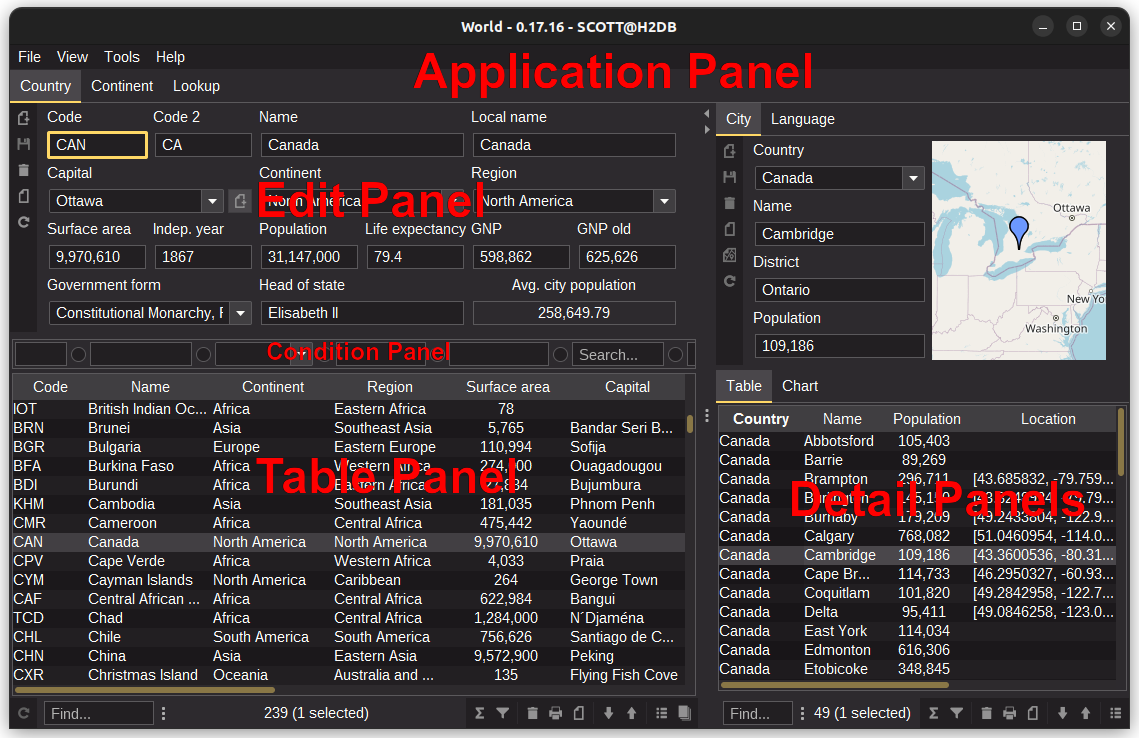
3.3. Architecture
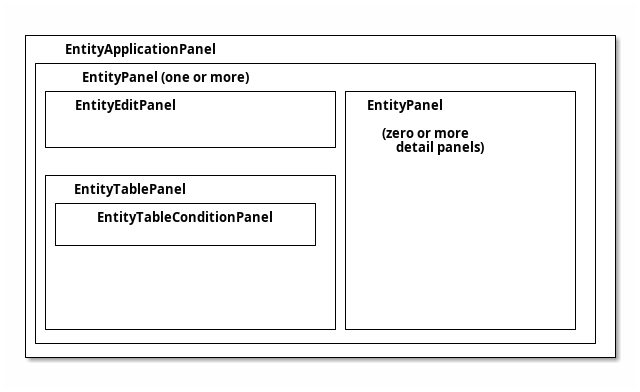
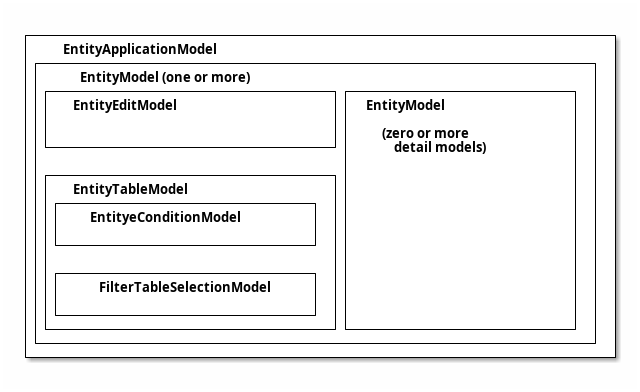
3.3.3. Assembly
EntityModel
  /**
   * Creates a SwingEntityModel based on the {@link Artist#TYPE} entity
   * with a detail model based on {@link Album#TYPE}
   * @param connectionProvider the connection provider
   */
  static SwingEntityModel artistModel(EntityConnectionProvider connectionProvider) {
    // create a default edit model
    SwingEntityEditModel artistEditModel =
            new SwingEntityEditModel(Artist.TYPE, connectionProvider);

    // create a default table model, wrapping the edit model
    SwingEntityTableModel artistTableModel =
            new SwingEntityTableModel(artistEditModel);

    // create a default model wrapping the table model
    SwingEntityModel artistModel =
            new SwingEntityModel(artistTableModel);

    // Note that this does the same as the above, that is, creates
    // a SwingEntityModel with a default edit and table model
    SwingEntityModel albumModel =
            new SwingEntityModel(Album.TYPE, connectionProvider);

    artistModel.detail().add(albumModel);

    return artistModel;
  }
EntityPanel
  /**
   * Creates a EntityPanel based on the {@link Artist#TYPE} entity
   * with a detail panel based on {@link Album#TYPE}
   * @param connectionProvider the connection provider
   */
  static EntityPanel artistPanel(EntityConnectionProvider connectionProvider) {
    // create the EntityModel to base the panel on (calling the above method)
    SwingEntityModel artistModel = artistModel(connectionProvider);

    // the edit model
    SwingEntityEditModel artistEditModel = artistModel.editModel();

    // the table model
    SwingEntityTableModel artistTableModel = artistModel.tableModel();

    // the album detail model
    SwingEntityModel albumModel = artistModel.detail().get(Album.TYPE);

    // create a EntityEditPanel instance, based on the artist edit model
    EntityEditPanel artistEditPanel = new EntityEditPanel(artistEditModel) {
      @Override
      protected void initializeUI() {
        create().textField(Artist.NAME).columns(15);
        addInputPanel(Artist.NAME);
      }
    };
    // create a EntityTablePanel instance, based on the artist table model
    EntityTablePanel artistTablePanel = new EntityTablePanel(artistTableModel);

    // create a EntityPanel instance, based on the artist model and
    // the edit and table panels from above
    EntityPanel artistPanel = new EntityPanel(artistModel, artistEditPanel, artistTablePanel);

    // create a new EntityPanel, without an edit panel and
    // with a default EntityTablePanel
    EntityPanel albumPanel = new EntityPanel(albumModel);

    artistPanel.detail().add(albumPanel);

    return artistPanel;
  }
3.3.4. Full Example
Show code
package is.codion.demos.chinook.tutorial;

import is.codion.common.db.database.Database;
import is.codion.common.utilities.user.User;
import is.codion.demos.chinook.domain.ChinookImpl;
import is.codion.demos.chinook.domain.api.Chinook.Album;
import is.codion.demos.chinook.domain.api.Chinook.Artist;
import is.codion.framework.db.EntityConnectionProvider;
import is.codion.framework.db.local.LocalEntityConnectionProvider;
import is.codion.swing.framework.model.SwingEntityEditModel;
import is.codion.swing.framework.model.SwingEntityModel;
import is.codion.swing.framework.model.SwingEntityTableModel;
import is.codion.swing.framework.ui.EntityEditPanel;
import is.codion.swing.framework.ui.EntityPanel;
import is.codion.swing.framework.ui.EntityTablePanel;

/**
 * When running this make sure the chinook demo module directory is the
 * working directory, due to a relative path to a db init script
 */
public final class ClientArchitecture {

  // tag::entityModel[]

  /**
   * Creates a SwingEntityModel based on the {@link Artist#TYPE} entity
   * with a detail model based on {@link Album#TYPE}
   * @param connectionProvider the connection provider
   */
  static SwingEntityModel artistModel(EntityConnectionProvider connectionProvider) {
    // create a default edit model
    SwingEntityEditModel artistEditModel =
            new SwingEntityEditModel(Artist.TYPE, connectionProvider);

    // create a default table model, wrapping the edit model
    SwingEntityTableModel artistTableModel =
            new SwingEntityTableModel(artistEditModel);

    // create a default model wrapping the table model
    SwingEntityModel artistModel =
            new SwingEntityModel(artistTableModel);

    // Note that this does the same as the above, that is, creates
    // a SwingEntityModel with a default edit and table model
    SwingEntityModel albumModel =
            new SwingEntityModel(Album.TYPE, connectionProvider);

    artistModel.detail().add(albumModel);

    return artistModel;
  }
  // end::entityModel[]
  // tag::entityPanel[]

  /**
   * Creates a EntityPanel based on the {@link Artist#TYPE} entity
   * with a detail panel based on {@link Album#TYPE}
   * @param connectionProvider the connection provider
   */
  static EntityPanel artistPanel(EntityConnectionProvider connectionProvider) {
    // create the EntityModel to base the panel on (calling the above method)
    SwingEntityModel artistModel = artistModel(connectionProvider);

    // the edit model
    SwingEntityEditModel artistEditModel = artistModel.editModel();

    // the table model
    SwingEntityTableModel artistTableModel = artistModel.tableModel();

    // the album detail model
    SwingEntityModel albumModel = artistModel.detail().get(Album.TYPE);

    // create a EntityEditPanel instance, based on the artist edit model
    EntityEditPanel artistEditPanel = new EntityEditPanel(artistEditModel) {
      @Override
      protected void initializeUI() {
        create().textField(Artist.NAME).columns(15);
        addInputPanel(Artist.NAME);
      }
    };
    // create a EntityTablePanel instance, based on the artist table model
    EntityTablePanel artistTablePanel = new EntityTablePanel(artistTableModel);

    // create a EntityPanel instance, based on the artist model and
    // the edit and table panels from above
    EntityPanel artistPanel = new EntityPanel(artistModel, artistEditPanel, artistTablePanel);

    // create a new EntityPanel, without an edit panel and
    // with a default EntityTablePanel
    EntityPanel albumPanel = new EntityPanel(albumModel);

    artistPanel.detail().add(albumPanel);

    return artistPanel;
  }
  // end::entityPanel[]

  public static void main(String[] args) {
    // Configure the database
    Database.URL.set("jdbc:h2:mem:h2db");
    Database.INIT_SCRIPTS.set("src/main/sql/create_schema.sql");

    // initialize a connection provider, this class is responsible
    // for supplying a valid connection or throwing an exception
    // in case a connection can not be established
    EntityConnectionProvider connectionProvider =
            LocalEntityConnectionProvider.builder()
                    .domain(new ChinookImpl())
                    .user(User.parse("scott:tiger"))
                    .build();

    EntityPanel artistPanel = artistPanel(connectionProvider);

    // lazy initialization
    artistPanel.initialize();

    // fetch data from the database
    artistPanel.model().tableModel().items().refresh();

    // uncomment the below line to display the panel
//    displayInDialog(null, artistPanel, "Artists");

    connectionProvider.close();
  }
}4. Testing
Codion applications are tested in layers, matching how they are built:
-
Domain testing — entity definitions, relationships and database operations, via DomainTest
-
Model testing — application logic in edit and table models, headless
-
Integration testing — workflows across entities and models
Since the model layer has no UI dependency, everything below the panels is testable without showing a window.
4.1. Test configuration
The test user is configured via the codion.test.user system property:
./gradlew test -Dcodion.test.user=scott:tiger4.2. Domain testing
The DomainTest base class verifies an entity definition against the database with a single method call per entity type: a randomly populated entity is inserted, selected, modified, updated and deleted, in a transaction which is rolled back — exercising the definition, its column mappings, primary key generation and foreign key relationships, without leaving a trace.
public class ChinookTest extends DomainTest {

  public ChinookTest() {
    super(new ChinookImpl(), ChinookEntityFactory::new);
  }

  @Test
  void album() {
    test(Album.TYPE);
  }

  @Test
  void artist() {
    test(Artist.TYPE);
  }
}
4.2.1. Custom entity factory
The random entities are created by an EntityFactory — extend DefaultEntityFactory to control the values of specific attributes, for entities with constraints random values cannot satisfy:
private static final class ChinookEntityFactory extends DefaultEntityFactory {

  private ChinookEntityFactory(EntityConnection connection) {
    super(connection);
  }

  @Override
  public void modify(Entity entity) {
    super.modify(entity);
    if (entity.type().equals(Album.TYPE)) {
      entity.set(Album.TAGS, List.of("tag_one", "tag_two", "tag_three"));
    }
  }

  @Override
  protected <T> T value(Attribute<T> attribute) {
    if (attribute.equals(Album.TAGS)) {
      return (T) List.of("tag_one", "tag_two");
    }

    return super.value(attribute);
  }
}
4.2.2. Testing database functions
Database functions and procedures are tested through a connection, in a transaction rolled back in a finally block — the standard pattern for any test modifying data:
@Test
void randomPlaylist() {
  EntityConnection connection = connection();
  connection.startTransaction();
  try {
    Entity genre = connection.selectSingle(Genre.NAME.equalTo("Metal"));
    int noOfTracks = 10;
    String playlistName = "MetalPlaylistTest";
    RandomPlaylistParameters parameters = new RandomPlaylistParameters(playlistName, noOfTracks, List.of(genre));
    Entity playlist = connection.execute(Playlist.RANDOM_PLAYLIST, parameters);
    assertEquals(playlistName, playlist.get(Playlist.NAME));
    List<Entity> playlistTracks = connection.select(PlaylistTrack.PLAYLIST_FK.equalTo(playlist));
    assertEquals(noOfTracks, playlistTracks.size());
    playlistTracks.stream()
            .map(playlistTrack -> playlistTrack.get(PlaylistTrack.TRACK_FK))
            .forEach(track -> assertEquals(genre, track.get(Track.GENRE_FK)));
  }
  finally {
    connection.rollbackTransaction();
  }
}
4.3. Model testing
Application logic in edit and table models is tested by constructing the model with a local connection provider and exercising it directly:
package is.codion.demos.world.model;

import is.codion.common.utilities.user.User;
import is.codion.demos.world.domain.WorldImpl;
import is.codion.demos.world.domain.api.World.Country;
import is.codion.framework.db.EntityConnectionProvider;
import is.codion.framework.db.local.LocalEntityConnectionProvider;

import org.junit.jupiter.api.Test;

import static org.junit.jupiter.api.Assertions.assertEquals;
import static org.junit.jupiter.api.Assertions.assertNull;

public class CountryEditModelTest {

  private static final User UNIT_TEST_USER =
          User.parse(System.getProperty("codion.test.user", "scott:tiger"));

  @Test
  void averageCityPopulation() {
    try (EntityConnectionProvider connectionProvider = createConnectionProvider()) {
      CountryEditModel countryEditModel = new CountryEditModel(connectionProvider);
      countryEditModel.editor().entity().set(connectionProvider.connection().selectSingle(
              Country.NAME.equalTo("Afghanistan")));
      assertEquals(583_025, countryEditModel.averageCityPopulation().get());
      countryEditModel.editor().entity().defaults();
      assertNull(countryEditModel.averageCityPopulation().get());
    }
  }

  private static EntityConnectionProvider createConnectionProvider() {
    return LocalEntityConnectionProvider.builder()
            .domain(new WorldImpl())
            .user(UNIT_TEST_USER)
            .build();
  }
}
Master-detail behavior tests the same way — select in the master, assert the detail:
package is.codion.demos.chinook.model;

import is.codion.common.utilities.user.User;
import is.codion.demos.chinook.domain.ChinookImpl;
import is.codion.demos.chinook.domain.api.Chinook.Album;
import is.codion.demos.chinook.domain.api.Chinook.Track;
import is.codion.framework.db.EntityConnection;
import is.codion.framework.db.EntityConnectionProvider;
import is.codion.framework.db.local.LocalEntityConnectionProvider;
import is.codion.framework.domain.entity.Entity;
import is.codion.framework.domain.entity.exception.EntityValidationException;
import is.codion.swing.framework.model.SwingEntityTableModel;

import org.junit.jupiter.api.Test;

import java.util.List;

import static is.codion.framework.db.EntityConnection.Update.where;
import static org.junit.jupiter.api.Assertions.assertEquals;

public final class AlbumModelTest {

  private static final String MASTER_OF_PUPPETS = "Master Of Puppets";

  @Test
  void albumRefreshedWhenTrackRatingIsUpdated() throws EntityValidationException {
    try (EntityConnectionProvider connectionProvider = createConnectionProvider()) {
      EntityConnection connection = connectionProvider.connection();
      connection.startTransaction();

      // Initialize all the tracks with an inital rating of 8
      Entity masterOfPuppets = connection.selectSingle(Album.TITLE.equalTo(MASTER_OF_PUPPETS));
      connection.update(where(Track.ALBUM_FK.equalTo(masterOfPuppets))
              .set(Track.RATING, 8)
              .build());
      // Re-select the album to get the updated rating, which is the average of the track ratings
      masterOfPuppets = connection.selectSingle(Album.TITLE.equalTo(MASTER_OF_PUPPETS));
      assertEquals(8, masterOfPuppets.get(Album.RATING));

      // Create our AlbumModel and configure the query condition
      // to populate it with only Master Of Puppets
      AlbumModel albumModel = new AlbumModel(connectionProvider);
      SwingEntityTableModel albumTableModel = albumModel.tableModel();
      albumTableModel.query().condition().get(Album.TITLE).set().equalTo(MASTER_OF_PUPPETS);
      albumTableModel.items().refresh();
      assertEquals(1, albumTableModel.items().size());

      List<Entity> modifiedTracks = connection.select(Track.ALBUM_FK.equalTo(masterOfPuppets)).stream()
              .peek(track -> track.set(Track.RATING, 10))
              .toList();

      // Update the tracks using the edit model
      albumModel.detail().get(Track.TYPE).editor().update(modifiedTracks);

      // Which should trigger the refresh of the album in the Album model
      // now with the new rating as the average of the track ratings
      assertEquals(10, albumTableModel.items().included().get(0).get(Album.RATING));

      connection.rollbackTransaction();
    }
  }

  private static EntityConnectionProvider createConnectionProvider() {
    return LocalEntityConnectionProvider.builder()
            .domain(new ChinookImpl())
            .user(User.parse("scott:tiger"))
            .build();
  }
}
4.4. Integration testing
Complete workflows, such as report generation, follow the same shape:
package is.codion.demos.world.model;

import is.codion.common.model.worker.ProgressWorker.ProgressReporter;
import is.codion.common.reactive.value.Value;
import is.codion.common.utilities.user.User;
import is.codion.demos.world.domain.WorldImpl;
import is.codion.demos.world.domain.api.World.City;
import is.codion.demos.world.domain.api.World.Country;
import is.codion.framework.db.EntityConnection;
import is.codion.framework.db.EntityConnectionProvider;
import is.codion.framework.db.local.LocalEntityConnectionProvider;
import is.codion.framework.domain.entity.Entity;
import is.codion.framework.domain.entity.attribute.Attribute;

import net.sf.jasperreports.engine.JRDataSource;
import net.sf.jasperreports.engine.JRException;
import net.sf.jasperreports.engine.JRField;
import net.sf.jasperreports.engine.base.JRBaseField;
import org.junit.jupiter.api.Test;

import java.util.List;

import static is.codion.framework.db.EntityConnection.Select.where;
import static is.codion.framework.domain.entity.OrderBy.ascending;
import static org.junit.jupiter.api.Assertions.assertEquals;
import static org.junit.jupiter.api.Assertions.assertThrows;

public final class CountryReportDataSourceTest {

  private static final User UNIT_TEST_USER =
          User.parse(System.getProperty("codion.test.user", "scott:tiger"));

  @Test
  void iterate() throws JRException {
    try (EntityConnectionProvider connectionProvider = createConnectionProvider()) {
      Value<Integer> progressCounter = Value.nullable();
      Value<String> publishedValue = Value.nullable();
      ProgressReporter<String> progressReporter = new ProgressReporter<>() {
        @Override
        public void report(int progress) {
          progressCounter.set(progress);
        }

        @Override
        public void publish(String... chunks) {
          publishedValue.set(chunks[0]);
        }
      };

      EntityConnection connection = connectionProvider.connection();
      List<Entity> countries =
              connection.select(where(Country.NAME.in("Denmark", "Iceland"))
                      .orderBy(ascending(Country.NAME))
                      .build());
      CountryReportDataSource countryReportDataSource = new CountryReportDataSource(countries.iterator(), connection, progressReporter);
      assertThrows(IllegalStateException.class, countryReportDataSource::cityDataSource);

      countryReportDataSource.next();
      assertEquals("Denmark", countryReportDataSource.getFieldValue(field(Country.NAME)));
      assertEquals("Europe", countryReportDataSource.getFieldValue(field(Country.CONTINENT)));
      assertEquals("Nordic Countries", countryReportDataSource.getFieldValue(field(Country.REGION)));
      assertEquals(43094d, countryReportDataSource.getFieldValue(field(Country.SURFACEAREA)));
      assertEquals(5330000, countryReportDataSource.getFieldValue(field(Country.POPULATION)));
      assertThrows(JRException.class, () -> countryReportDataSource.getFieldValue(field(City.LOCATION)));

      JRDataSource denmarkCityDataSource = countryReportDataSource.cityDataSource();
      denmarkCityDataSource.next();
      assertEquals("København", denmarkCityDataSource.getFieldValue(field(City.NAME)));
      assertEquals(495699, denmarkCityDataSource.getFieldValue(field(City.POPULATION)));
      assertThrows(JRException.class, () -> denmarkCityDataSource.getFieldValue(field(Country.REGION)));
      denmarkCityDataSource.next();
      assertEquals("Århus", denmarkCityDataSource.getFieldValue(field(City.NAME)));

      countryReportDataSource.next();
      assertEquals("Iceland", countryReportDataSource.getFieldValue(field(Country.NAME)));

      JRDataSource icelandCityDataSource = countryReportDataSource.cityDataSource();
      icelandCityDataSource.next();
      assertEquals("Reykjavík", icelandCityDataSource.getFieldValue(field(City.NAME)));

      assertEquals(2, progressCounter.get());
      assertEquals("Iceland", publishedValue.get());
    }
  }

  private static EntityConnectionProvider createConnectionProvider() {
    return LocalEntityConnectionProvider.builder()
            .domain(new WorldImpl())
            .user(UNIT_TEST_USER)
            .build();
  }

  private static JRField field(Attribute<?> attribute) {
    return new TestField(attribute.name());
  }

  private static final class TestField extends JRBaseField {

    private TestField(String name) {
      this.name = name;
    }
  }
}
4.5. Practices
-
Run DomainTest over every entity type — it is one line per entity and catches definition/schema drift immediately.
-
Transactions with rollback keep tests isolated and repeatable — no test data cleanup.
-
Test observable behavior — model state is exposed as Value/State/Event; assert on those, the same surface the UI binds to.
-
Load test early — see application load testing for exercising the application under concurrent users.
5. Server
The Codion server provides RMI and HTTP connection options to clients.
5.1. Features
-
Optional, firewall friendly RMI; uses one way communication without callbacks, uses two ports, one for the RMI Registry and one for client connections — or none, when disabled for HTTP-only deployments
-
Integrated web server for serving HTTP client connections, based on Javalin and Jetty
-
All user authentication left to the database by default
-
Comprehensive administration and monitoring facilities via the ServerMonitor
-
Optional JMX metrics for Prometheus/Grafana and standard JMX tooling
-
Featherweight server with moderate memory and CPU usage
5.2. Security
Here’s a great overview of RMI security risks and mitigations.
5.2.1. Authentication
The Codion server does not perform any user authentication by default, it leaves that up the underlying database. An authentication layer can be added by implementing an Authenticator and registering it with the ServiceLoader.
5.2.2. RMI SSL encryption
To enable SSL encryption between client and server, create a keystore and truststore pair and set the following system properties.
5.2.4. Serialization filtering
The framework provides a way to configure a ObjectInputFilter for deserialization, by specifying a ObjectInputFilterFactory implementation class with the following system property.
codion.server.objectInputFilterFactory=\
my.serialization.filter.MyObjectInputFilterFactory|
Important
|
By default, an ObjectInputFilterFactory is required for the server to start. If no filter factory is configured, the server will throw an exception on startup. This is a security measure to prevent accidental deployment without deserialization filtering.
|
To explicitly disable this requirement (not recommended for production), set:
codion.server.objectInputFilterFactoryRequired=falsePattern filter
To use the built-in pattern based serialization filter, set the following system property.
codion.server.objectInputFilterFactory=\
    is.codion.common.rmi.server.SerializationFilterFactory
To use serialization filter patterns specified in a string, set the following system property.
|
Important
|
SerializationFilterFactory automatically appends the exclude all pattern !* if it’s missing, but it is good practice to always include it in your pattern list.
|
codion.server.serialization.filter.pattern=pattern1;pattern2;!*This is equivalent to setting the following:
jdk.serialFilter=pattern1;pattern2;!*To use the serialization pattern filter based on patterns in a file, set the following system property.
The file may contain all the patterns in a single line, using the ; delimiter or one pattern per line, without a delimiter. Lines starting with '#' are skipped as comments.
codion.server.serialization.filter.patternFile=config/patterns.txtcodion.server.serialization.filter.patternFile=classpath:patterns.txt
A list of deserialized classes can be created during a server dry-run by adding the following system property. The file containing all classes deserialized during the run is written to disk on server shutdown.
codion.server.serialization.filter.dryRunFile=deserialized.txtExample whitelist
java.lang.**
java.math.**
java.time.**
java.util.**
# JasperReports
java.awt.Color
is.codion.common.**
is.codion.framework.**
is.codion.demos.chinook.domain.api.*
is.codion.demos.world.domain.api.*
# ServerMonitor
ch.qos.logback.classic.Level
# For loading JasperReport from classpath
net.sf.jasperreports.compilers.**
net.sf.jasperreports.engine.**
# Reject all other classes
!*
Resource exhaustion limits
The pattern-based serialization filter supports JEP 290 resource limits to prevent resource exhaustion attacks during deserialization. These limits are enforced during deserialization, before objects are fully materialized in memory.
The following system properties configure the resource limits (with their default values):
codion.server.serialization.filter.maxBytes=10485760    # Maximum stream size: 10 MB
codion.server.serialization.filter.maxArray=100000      # Maximum array length: 100,000 elements
codion.server.serialization.filter.maxDepth=100         # Maximum object graph depth: 100 levels
codion.server.serialization.filter.maxRefs=1000000      # Maximum internal references: 1,000,000 refs
These limits are automatically prepended to the serialization filter patterns. For example, with a pattern file containing class names, the effective filter becomes:
maxbytes=10485760;maxarray=100000;maxdepth=100;maxrefs=1000000;java.lang.String;is.codion.**;!*Important: These limits provide the primary defense against resource exhaustion attacks. Application-level validation (such as User credential length limits) cannot prevent memory allocation during deserialization, making these JEP 290 limits essential for security.
Serialization Filter Dry Run
The serialization filter dry-run mode helps you discover exactly which classes are deserialized during program execution. This is essential when creating or updating serialization filter patterns, as it eliminates guesswork about what classes need to be whitelisted.
How It Works
When dry-run mode is enabled, the framework records every class that gets deserialized during the program’s lifetime. On JVM shutdown, it writes a sorted list of unique class names to the specified file. This file can then be used directly as input for the pattern-based filter.
|
Important
|
During dry-run mode, all classes are accepted (no filtering is performed). This allows you to capture the complete set of deserialized classes without being blocked by an incomplete filter. |
Configuration
Enable dry-run mode by setting the following system property:
codion.server.serialization.filter.dryRunFile=deserialized_classes.txtThe specified file will be created (or overwritten) on JVM shutdown with the discovered class names.
To prevent data loss if the JVM crashes during dry-run, the results are automatically flushed to disk periodically (default: every 30 seconds):
codion.server.serialization.filter.dryRunFlushInterval=30Set dryRunFlushInterval=0 to disable periodic flushing. For dry-runs in unstable environments, consider setting a shorter interval (e.g., dryRunFlushInterval=5).
Direct Usage Example
The dry-run mode can be used outside of the server context to analyze deserialization in any Java application. Here’s an example that discovers which classes are deserialized when loading a JasperReports report:
public static void main(String[] args) {
    // Set the dry-run output file
    SerializationFilterFactory.SERIALIZATION_FILTER_DRYRUN_FILE.set(
        "/path/to/output.txt");

    // Configure the filter in dry-run mode
    ObjectInputFilter.Config.setSerialFilter(
        new SerializationFilterFactory().createObjectInputFilter());

    // Perform operations that deserializes data
    Report.REPORT_PATH.set("path/to/reports");
    JRReport report = JasperReports.fileReport("customer_report.jasper");
    report.load();

    // Dry-run output is written on JVM shutdown
}
Workflow
-
Enable dry-run mode with the
dryRunFileproperty -
Run your application through typical usage scenarios to trigger deserialization
-
Shut down the JVM gracefully to write the discovered classes to the file
-
Review the output file containing the sorted list of class names
-
Use the output as your whitelist by setting it as the pattern file:
codion.server.serialization.filter.patternFile=deserialized_classes.txtArray Handling
The dry-run mode automatically handles array types by extracting and recording the component type. For example, if java.lang.String[] is deserialized, the output file will contain java.lang.String, not the array type itself.
Best Practices
-
Run dry-run mode in a test environment that exercises all application features
-
Include all expected user workflows to ensure complete coverage
-
Use dry-run mode when adding new features that might deserialize new types
-
Keep the dry-run output file under version control to track changes over time
-
Re-run dry-run mode after dependency upgrades that might introduce new deserialized classes
5.3. HTTP
Codion provides HTTP-based connections as an alternative to RMI, accessible via the HttpEntityConnection interface. The framework supports two distinct HTTP connection types, each with different serialization strategies optimized for different scenarios.
5.3.1. Connection Types
Serialization-based Connection
The default HTTP connection uses Java serialization for all communication:
-
Performance: More efficient for complex object graphs with automatic deduplication
-
Memory: Lower memory footprint due to object reference handling
-
Security: Requires proper deserialization filtering (see Serialization filtering)
-
Configuration: Server-side enabled via
codion.server.http.serialization=true(default:false)
The serialization-based connection is ideal for trusted networks and scenarios where performance is critical.
JSON-based Connection
The JSON connection provides a more security-conscious approach:
-
Security: Eliminates server-side deserialization vulnerabilities by using JSON for incoming requests
-
Transparency: Human-readable request/response format for debugging
-
Compatibility: Works with non-Java clients (when using JSON throughout)
-
Configuration: Server-side enabled via
codion.server.http.json=true(default:true)
The JSON connection uses a hybrid serialization strategy:
| Operation | Request | Response |
|---|---|---|
CRUD |
JSON |
JSON |
JSON |
Java serialization |
|
JSON |
N/A |
|
JSON |
Java serialization |
|
N/A |
Java serialization |
|
Important
|
The hybrid approach protects the server from deserialization attacks while maintaining compatibility with complex return types like JasperPrint and Entities that don’t support JSON serialization.
|
5.3.2. Choosing a Connection Type
Use serialization-based connections when:
-
Operating in a trusted network environment
-
Performance and memory efficiency are priorities
-
You have proper deserialization filtering configured
-
All clients are Java-based
Use JSON-based connections when:
-
Security is the primary concern (avoiding server-side deserialization)
-
Operating in less trusted environments
-
You want human-readable request/response payloads
-
You need non-Java client compatibility (with custom JSON handling)
5.3.3. JSON Connection Requirements
When using the JSON connection with functions, procedures, or reports that have parameters, you must register parameter types with the EntityObjectMapper. This is required because Jackson needs target types to deserialize JSON, and generic type parameters are erased at runtime.
See the manual section on HTTP/JSON Serialization for details on registering parameter types via EntityObjectMapperFactory.
5.3.4. Server Configuration
Enable or disable connection types on the server:
codion.server.rmi=true                  # Default: true
codion.server.http.serialization=false  # Default: false
codion.server.http.json=true            # Default: true
All can be enabled simultaneously, allowing clients to choose their preferred connection type.
With codion.server.rmi=false the server serves HTTP only: no RMI objects are exported, no RMI registry
is created and a remote connect() is refused — the RMI ports simply do not exist.
The RMI admin interface is controlled independently; configuring an admin port exports the server for the
ServerMonitor, with or without RMI client connections.
Disabling RMI is the recommended baseline for an internet-facing server, see
Internet deployment.
5.4. Monitoring
Beyond the ServerMonitor, the server can register its runtime metrics as JMX MBeans on the platform MBean server, making them available to standard tooling — Prometheus and Grafana via the Prometheus JMX Exporter, as well as JConsole and VisualVM. This runs alongside, not instead of, the Swing server monitor.
The MBeans are opt-in and off by default; enable them with:
codion.server.jmx=true # Default: falseThis registers three kinds of MBean on the platform MBean server:
| ObjectName | Attributes |
|---|---|
|
|
|
|
|
|
The JVM’s own thread/GC/CPU/memory numbers are standard platform MXBeans, exported separately by the agent, so they are not duplicated here. The MBeans are local to the JVM — nothing is exposed until the exporter agent is attached, and no JMX remote connector is involved.
The framework/server/src/main/monitoring directory contains a ready-to-use JMX Exporter configuration
(jmx_exporter.yaml), a starter Grafana dashboard (grafana-dashboard.json), and a step-by-step guide
(README.md) covering the exporter agent, the Prometheus scrape config, the Grafana import and the full
metrics reference.
5.5. Configuration
5.5.1. Example configuration file
# Database configuration
codion.db.url=jdbc:h2:mem:h2db
codion.db.useOptimisticLocking=true
codion.db.countQueries=true
codion.db.initScripts=\
    config/employees/create_schema.sql,\
    config/chinook/create_schema.sql,\
    config/petstore/create_schema.sql,\
    config/world/create_schema.sql

# The admin user credentials, used by the server monitor application
codion.server.admin.user=scott:tiger

# Client method tracing disabled by default
codion.server.methodTracing=false

# A connection pool based on this user is created on startup
codion.server.connectionPoolUsers=scott:tiger

# The port used by clients
codion.server.port=2222

# The port for the admin interface, used by the server monitor
codion.server.admin.port=4444

# RMI Registry port
codion.server.registryPort=1099

# Any auxiliary servers to run alongside this server
codion.server.auxiliaryServerFactories=\
    is.codion.framework.servlet.EntityServiceFactory

# Specifies whether to expose json based services (default true)
codion.server.http.json=true

# Specifies whether to expose java serialization based services (default false)
codion.server.http.serialization=true

# The http port
codion.server.http.port=8080

# Specifies whether to use https
codion.server.http.secure=false

# The ObjectInputFilterFactory class to use
codion.server.objectInputFilterFactory=\
    is.codion.common.rmi.server.SerializationFilterFactory

# The serialization pattern file to use for RMI deserialization filtering
codion.server.serialization.filter.patternFile=\
    ../config/serialization-whitelist.txt

# RMI configuration
java.rmi.server.hostname=localhost
java.rmi.server.randomIDs=true

# SSL configuration
javax.net.ssl.keyStore=../config/keystore.jks
javax.net.ssl.keyStorePassword=crappypass

# Used to connect to the server to shut it down
#codion.client.trustStore=../config/truststore.jks
5.6. Code examples
Absolute bare-bones examples of how to run the EntityServer and connect to it.
5.6.1. RMI
    Database database = H2DatabaseFactory
            .create("jdbc:h2:mem:testdb",
                    "src/main/sql/create_schema.sql");

    EntityServerConfiguration configuration =
            EntityServerConfiguration.builder()
                    .port(SERVER_PORT)
                    .registryPort(REGISTRY_PORT)
                    .domainClasses(List.of(Store.class.getName()))
                    .database(database)
                    .sslEnabled(false)
                    .build();

    EntityServer server = EntityServer.startServer(configuration);

    RemoteEntityConnectionProvider connectionProvider =
            RemoteEntityConnectionProvider.builder()
                    .port(SERVER_PORT)
                    .registryPort(REGISTRY_PORT)
                    .domain(Store.DOMAIN)
                    .user(parse("scott:tiger"))
                    .build();

    EntityConnection connection = connectionProvider.connection();

    List<Entity> customers = connection.select(all(Customer.TYPE));
    customers.forEach(System.out::println);

    connection.close();

    server.shutdown();
5.6.2. HTTP
    Database database = H2DatabaseFactory
            .create("jdbc:h2:mem:testdb",
                    "src/main/sql/create_schema.sql");

    EntityService.PORT.set(HTTP_PORT);

    EntityServerConfiguration configuration =
            EntityServerConfiguration.builder()
                    .port(SERVER_PORT)
                    .registryPort(REGISTRY_PORT)
                    .domainClasses(List.of(Store.class.getName()))
                    .database(database)
                    .sslEnabled(false)
                    .auxiliaryServerFactory(List.of(EntityServiceFactory.class.getName()))
                    .build();

    EntityServer server = EntityServer.startServer(configuration);

    HttpEntityConnectionProvider connectionProvider =
            HttpEntityConnectionProvider.builder()
                    .port(HTTP_PORT)
                    .https(false)
                    .domain(Store.DOMAIN)
                    .user(parse("scott:tiger"))
                    .build();

    EntityConnection connection = connectionProvider.connection();

    List<Entity> customers = connection.select(all(Customer.TYPE));
    customers.forEach(System.out::println);

    connection.close();

    server.shutdown();
6. Internet deployment
The Codion server is designed for a trusted network: a known client, on a network you control. This page is about what changes when that assumption is removed — when the HTTP entity service must be reachable from the open internet, typically to serve a mobile client.
The short version: prefer not to. The rest of this page explains why, what to do instead, and — if exposure is unavoidable — what must be true before the server faces the internet.
6.1. Prefer not to
The most secure public port is the one that does not exist.
Before hardening a public endpoint, ask whether the users can be enumerated. Employees, members of an institution, customers with an account — if the set of people who may connect is knowable in advance, they can be given network access instead of the internet being given application access.
Ordered by preference:
- Mesh VPN (WireGuard, Tailscale, Netbird)
-
The server has no inbound port open at all; peers reach it over an authenticated encrypted mesh, with access controlled by identity. All of these have Android and desktop clients, and work over cellular. For a known user population this is both the most secure and — after setup — the least friction.
- Institutional VPN
-
If one already exists, use it. Users toggle the VPN before opening the application, exactly as they would for any other internal service.
- Mutual TLS (mTLS) at a reverse proxy
-
No tunnel, but only clients presenting a provisioned client certificate complete the TLS handshake. Anonymous traffic is rejected by the proxy before a single byte reaches the application. Android stores client certificates in its keystore, so this is a practical option for mobile clients where a VPN is not.
- Public HTTPS
-
Only when the user population genuinely cannot be enumerated.
|
Note
|
This is not a statement about the quality of the Codion server. It is a statement about what a public port implies. Exposing the entity service means placing a JVM containing Javalin, Jetty, Jackson, your domain model and a JDBC driver behind a listener anyone on earth can reach. You inherit the vulnerability stream of that entire stack, permanently, and must patch on disclosure timelines. A WireGuard listener is a few thousand lines of heavily reviewed code with no dynamic dispatch and no deserialization. Reducing attack surface beats defending it. |
6.2. What the security model assumes
Three properties are entirely reasonable on a trusted network, and become the crux of the problem on the internet.
Client credentials are database credentials. By default, the user supplied by the client is the user the server opens a database connection with. Exposing the entity service therefore exposes your database login surface. See 2. Authenticate against your application, not the database.
Authorization is database privileges. Codion has no per-operation or row-level authorization layer. Authorization is enforced by the database, below the application, where it cannot be bypassed — the same model the framework has used since its Oracle Forms ancestry. This is a strength, provided the database user actually constrains the client.
The client is trusted to be well behaved. A desktop client on your network runs your code.
A mobile application runs on a device its user controls, and its traffic can be modified.
Assume a hostile client will send any request the wire protocol permits — including
delete(all(…)), an unbounded select, or any registered function or procedure. Whatever the
database user is permitted to do, assume the client can do.
A VPN restores the assumption the design was built on. That is not a workaround; it is aligning the deployment with the design.
6.3. If you expose the server
Everything below is necessary. None of it is sufficient on its own.
6.3.1. 1. Disable RMI
An internet-facing server serves HTTP only, so switch the RMI machinery off:
codion.server.rmi=falseWith RMI disabled the server exports no RMI objects, creates no registry and refuses a remote
connect() outright — the entity service serves its clients in-process, and the RMI attack
surface does not exist rather than being defended. The RMI admin interface is controlled
independently: configuring an admin port exports the server for the EntityServerMonitor, so
leave it unconfigured on an internet-facing host, or keep it firewalled to the management network.
|
Important
|
The HTTP port still binds all interfaces — |
6.3.2. 2. Authenticate against your application, not the database
Implement an Authenticator that validates the client’s credentials against your own user store, then swaps in a database user with RemoteClient.withDatabaseUser(). Internet clients then never present database credentials, and a failed login costs no database connection attempt.
See also Authentication.
ChinookAuthenticator demonstrates the
pattern: authenticate the client’s user against an application table, then return
remoteClient.withDatabaseUser(databaseUser).
For mobile clients, have the application present an opaque, revocable token as the password. The device then never stores a reusable credential, and access can be withdrawn without changing anyone’s password.
|
Caution
|
Codion performs no login throttling, lockout or failed-attempt counting. Without an
|
6.3.3. 3. Keep authorization in the database
Map each application role to a separate pooled database user with only the privileges that
role needs, and select the database user in the Authenticator based on the authenticated
application user.
A compromised client then cannot exceed its role: a DELETE it is not granted fails in the
database engine, not in application code that an attacker has already bypassed. Views and
row-level security extend this to row granularity.
A single shared database user for all clients discards the framework’s only authorization mechanism.
6.3.4. 4. Leave Java serialization disabled
codion.server.rmi=false # (1)
codion.server.http.serialization=false # (2)
codion.server.http.json=true
codion.server.objectInputFilterFactoryRequired=true # (3)-
See 1. Disable RMI.
-
The default. With serialization disabled the serial routes are not registered, and no Java deserialization of client-supplied input occurs anywhere in the HTTP path. This is a strong property; do not give it up.
-
The default. The
EntityServerrefuses to start without a deserialization filter, which protects the RMI interface where one is enabled. See Serialization filtering.
6.3.5. 5. Put a reverse proxy in front
Terminate TLS at the proxy rather than managing a Jetty keystore, and set
codion.server.http.secure=false so the entity service serves plain HTTP to the proxy over
localhost (protected by the firewall from 1. Disable RMI).
|
Note
|
If you terminate TLS at the entity service instead ( |
limit_req_zone $binary_remote_addr zone=codion:10m rate=10r/s;

server {
    listen 443 ssl;
    http2 on;
    server_name entities.example.org;

    ssl_certificate     /etc/letsencrypt/live/entities.example.org/fullchain.pem;
    ssl_certificate_key /etc/letsencrypt/live/entities.example.org/privkey.pem;
    ssl_protocols       TLSv1.2 TLSv1.3;
    add_header Strict-Transport-Security "max-age=63072000" always;

    client_max_body_size 8m; # (1)

    location /entities/serial/ {
        return 404; # (2)
    }

    location /entities/json/ {
        limit_req zone=codion burst=20 nodelay; # (3)

        proxy_pass http://127.0.0.1:8080;
        proxy_set_header X-Forwarded-For $remote_addr; # (4)
        proxy_set_header Host $host;

        proxy_connect_timeout 5s;
        proxy_read_timeout    60s;
        proxy_send_timeout    60s;
    }

    location / {
        return 404;
    }
}-
The entity service applies no request body size limit. A sufficiently large insert body is an out-of-memory condition.
-
Belt and braces: the serial routes are already unregistered by default.
-
The only defense against credential stuffing and brute force, since the server counts nothing.
-
proxy_set_header, notadd_header. The entity service honoursX-Forwarded-Forwhen present, and it is a client-supplied header — the proxy must overwrite it, or a client can spoof the host recorded against its connection.
6.3.6. 6. Bound the resources a client can consume
Select.limit is supplied by the client and there is no server-side cap: a hostile client can
request every row of your largest table. The available bounds are below the framework:
-
A database statement timeout.
-
codion.db.pool.maximumPoolSize— caps concurrent database work. -
codion.server.connectionLimit— caps concurrent clients. -
codion.server.idleConnectionTimeout— reaps abandoned connections.
6.3.7. 7. Harden the client
A JSON client that supplies its own Domain performs no Java deserialization at all. Error
responses are a typed JSON envelope, and function and report results are JSON — a report exported
server-side (PDF, for example) reaches the client as bytes no reporting engine is required to read.
One serialized site remains, and it is avoidable:
-
The
entitiesroute replies with a serialized object. Supply theDomainto the connection builder and the client never calls it, removing a round trip along with the deserialization.
|
Note
|
Injecting the domain has an information cost: the domain implementation carries the
database-level details — physical table and column names, column expressions, custom select and
subquery SQL — and ships them inside a client package anyone can decompile. The entity
definitions served by the Schema secrecy is reconnaissance-resistance, not a security control — authorization must hold
with the schema known (it does: it is database privileges) — but query SQL can be genuine
intellectual property, and there is no reason to hand out a map. If that matters for your
deployment, have the client fetch its definitions and accept the single Java-deserialized
response, from the authenticated server, over pinned TLS, with the |
One opt-in deserialization exists: a client that displays reports with a JRViewer may register
reports with JRExport.SERIALIZED and reconstruct the JasperPrint via JasperReports.loadPrint(),
which deserializes server-supplied bytes. For an internet-facing client prefer a bytes-out export
(PDF, HTML) instead; if SERIALIZED is used, the filter advice below applies.
The client trusts the server it authenticated to. Over correct TLS that is safe; a user-installed certificate authority on a rooted or coerced device is not correct TLS.
-
Pin the server certificate, or at minimum configure Android’s network security config to trust only system certificate authorities.
-
If reports use
JRExport.SERIALIZED, install a JVM-wideObjectInputFilterallowingnet.sf.jasperreports.engine.**alongside Codion and your domain classes —loadPrint()honours it, being ordinary Java deserialization. Worth doing regardless, as defence in depth.
6.4. Error responses
On a JSON connection an error response is a typed JSON envelope, never a serialized exception.
Nothing on the wire names a class; the client reconstructs the exception from a closed set of
error kinds, so an error response cannot instantiate an arbitrary type. An unrecognized kind
degrades to a plain DatabaseException.
Neither a stack trace nor a cause chain crosses the wire. A server-originated exception carries the stack trace of the client throw site. An exception the server does not recognize carries a generic message and a correlation id identifying the server log entry — nothing else about it is disclosed.
The SQL statement, error code and SQL state are transient on DatabaseException and have never
crossed the wire.
The status code categorizes by whose fault the request was, and the same classification decides the server log severity:
401 |
Authentication failure, including a malformed |
400 |
A request the server rejects as malformed |
404, 409 |
Not found, and the conflicts a correctly functioning application produces — optimistic locking, referential integrity, unique constraints |
503, 504 |
No connection available, query timeout |
500 |
A genuine server fault. A report failure is a named 500 whose message passes through; an unrecognized exception carries only a generic message and a correlation id |
Consequently a 5xx response is a true fault signal, and an ERROR-level log entry is a genuine fault. An optimistic locking conflict is a 409 logged at DEBUG. Alert on 5xx.
A serial connection is a Java serialization channel by definition and is unchanged: it receives a serialized exception.
6.5. What Codion does not provide
Stated plainly, because a security control you believe exists is worse than one you know does not:
-
No rate limiting, login throttling, lockout, or failed-attempt counting. Provide these at the proxy.
-
No per-operation or row-level authorization. Authorization is database privileges. See 3. Keep authorization in the database.
-
No server-side cap on query result size.
Select.limitis a client-supplied value. -
No bind-address configuration. Every open port listens on all interfaces; use a firewall. The RMI ports can be removed entirely (
codion.server.rmi=false), the HTTP port cannot. -
No audit log of the operations a client performs. Method tracing exists for diagnostics, not for audit.
6.6. Checklist
-
Can the users be enumerated? If yes, use a VPN and stop here.
-
codion.server.rmi=false, no admin port; JMX off or firewalled. Only the HTTP port reachable, ideally only from localhost. -
An
Authenticatorin place, authenticating against the application, swapping in a role-specific pooled database user. -
Database privileges actually constrain each role.
-
codion.server.http.serialization=false,codion.server.objectInputFilterFactoryRequired=true. -
Reverse proxy: TLS, rate limiting, body size limit, timeouts,
X-Forwarded-Foroverwritten. -
Statement timeout, pool size, connection limit, idle timeout all set.
-
Client: certificate pinning; a deliberate domain decision — injected (schema ships with the client) or fetched (one deserialized response, schema stays home); an
ObjectInputFilterif definitions are fetched or reports useJRExport.SERIALIZED. -
Alerting on 5xx responses and ERROR log entries, both of which now mean a genuine fault.
-
A penetration test before the first real user connects.
7. Packaging
Codion applications ship as ordinary Java applications, and since every framework module is a JPMS module, they package naturally with jlink — a self-contained image with a custom runtime, no pre-installed Java required — and jpackage, which wraps that image in a native installer (msi/exe, deb/rpm, dmg/pkg).
The Badass JLink Gradle plugin handles both, including the common real-world wrinkle: non-modular dependencies, which it merges into a single synthetic module.
plugins {
    id("org.beryx.jlink")
}

application {
    mainModule = "com.myapp.client"
    mainClass = "com.myapp.client.MyAppPanel"
}

jlink {
    imageName = "myapp"
    options = listOf("--strip-debug", "--no-header-files", "--no-man-pages")

    jpackage {
        if (org.gradle.internal.os.OperatingSystem.current().isLinux) {
            installerType = "deb"
        }
    }
}
7.1. Service provider modules
jlink includes only modules reachable from the main module’s requires graph — and a module that exists solely to provide a service is reachable from nobody’s. Such modules must be added explicitly, or they are silently absent from the image:
-
A domain model module on a server or local client (discovered via ServiceLoader).
-
An EntityObjectMapperFactory module for JSON connections (see HTTP & JSON clients).
-
JDBC drivers and Look&Feel plugins, when service-loaded.
The jlink plugin’s addExtraDependencies and the --add-modules option cover these. A missing provider fails at runtime, not at build time — an unknown-domain error on connect, or an unregistered-mapper error at first use — so when a jlinked application misbehaves where the IDE run works, a missing service module is the first suspect.
7.2. Optional engine extensions
Some dependencies register themselves via classpath-scanned extension files rather than services — the JasperReports PDF exporter, for example — and are invisible to the module graph in the same way. See Reporting with JasperReports for the --add-modules net.sf.jasperreports.pdf case.
7.3. Working examples
The Chinook demo maintains complete, working packaging for all deployment shapes: a jlinked/jpackaged desktop client (chinook-client-local), a jlinked multi-protocol server (chinook-server) and a Docker server image (chinook-server-docker). Rather than reproducing their build files here — where they would drift — use them directly as templates.
For server deployment specifics — configuration, TLS, monitoring — see Server, and Internet deployment if the server faces the internet.
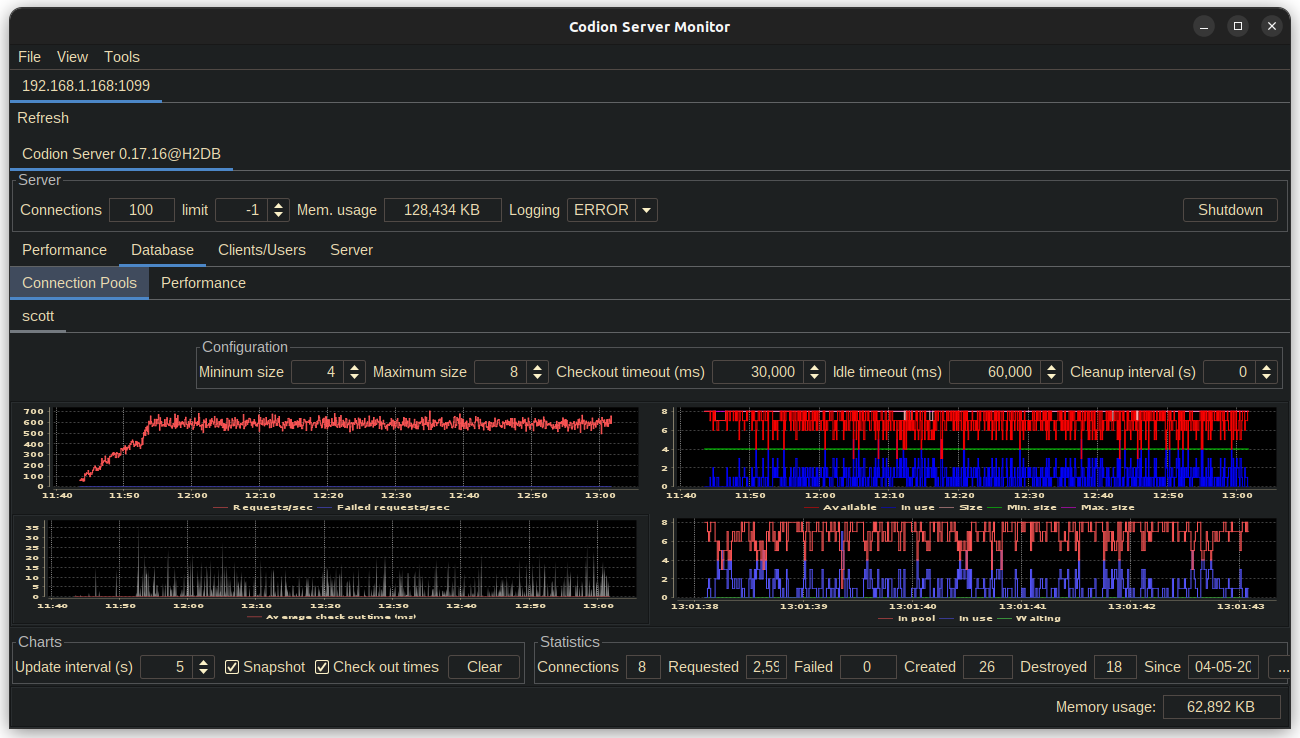
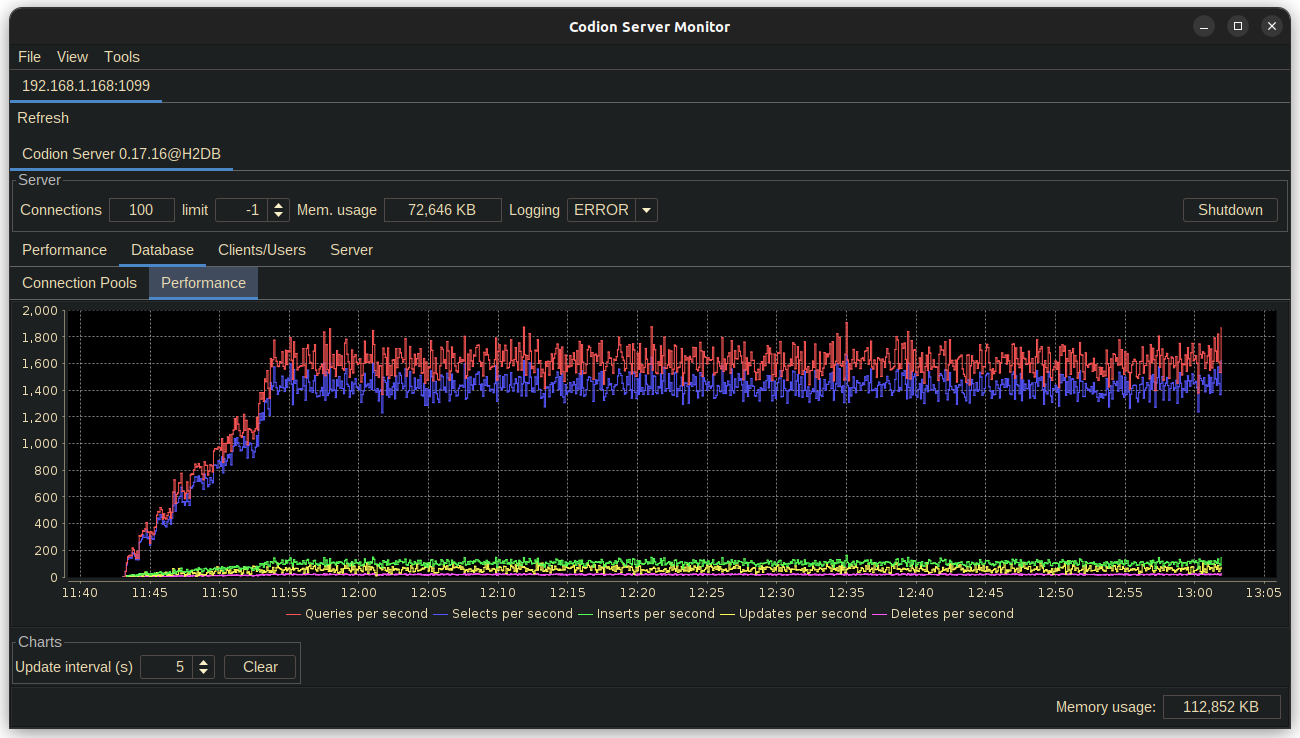
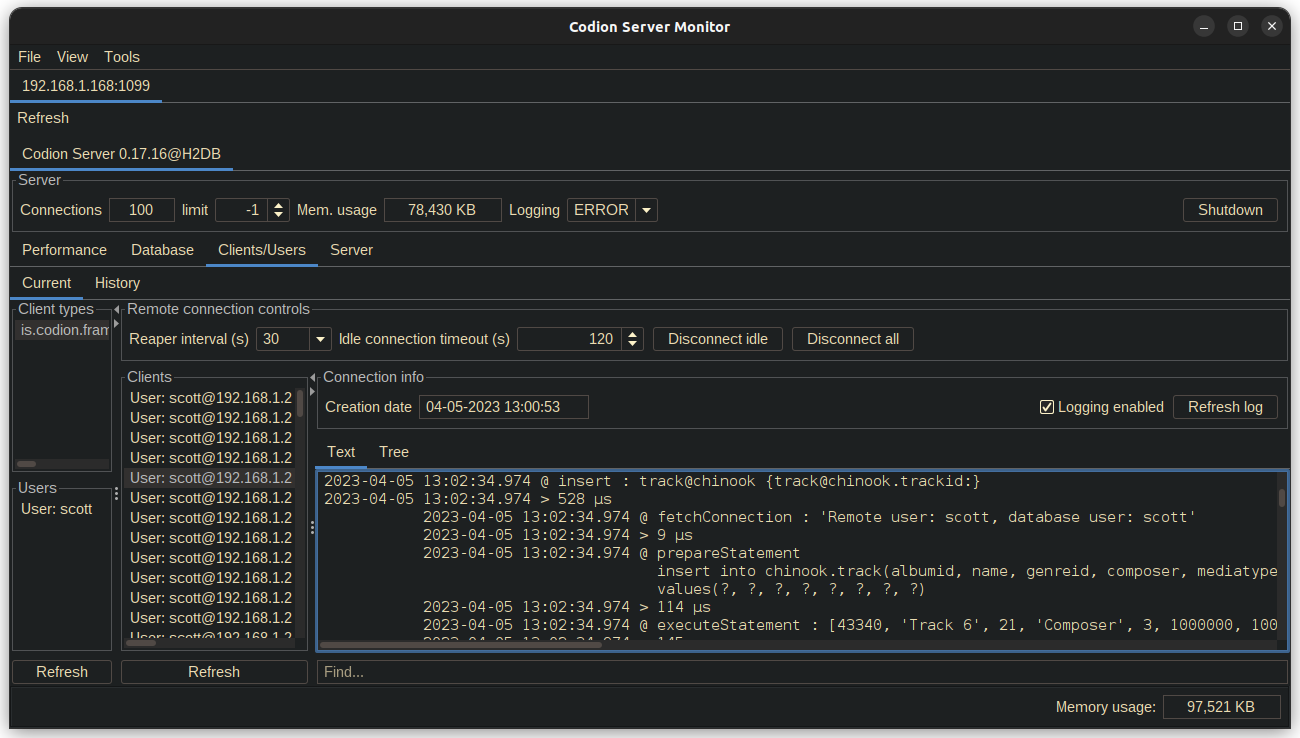
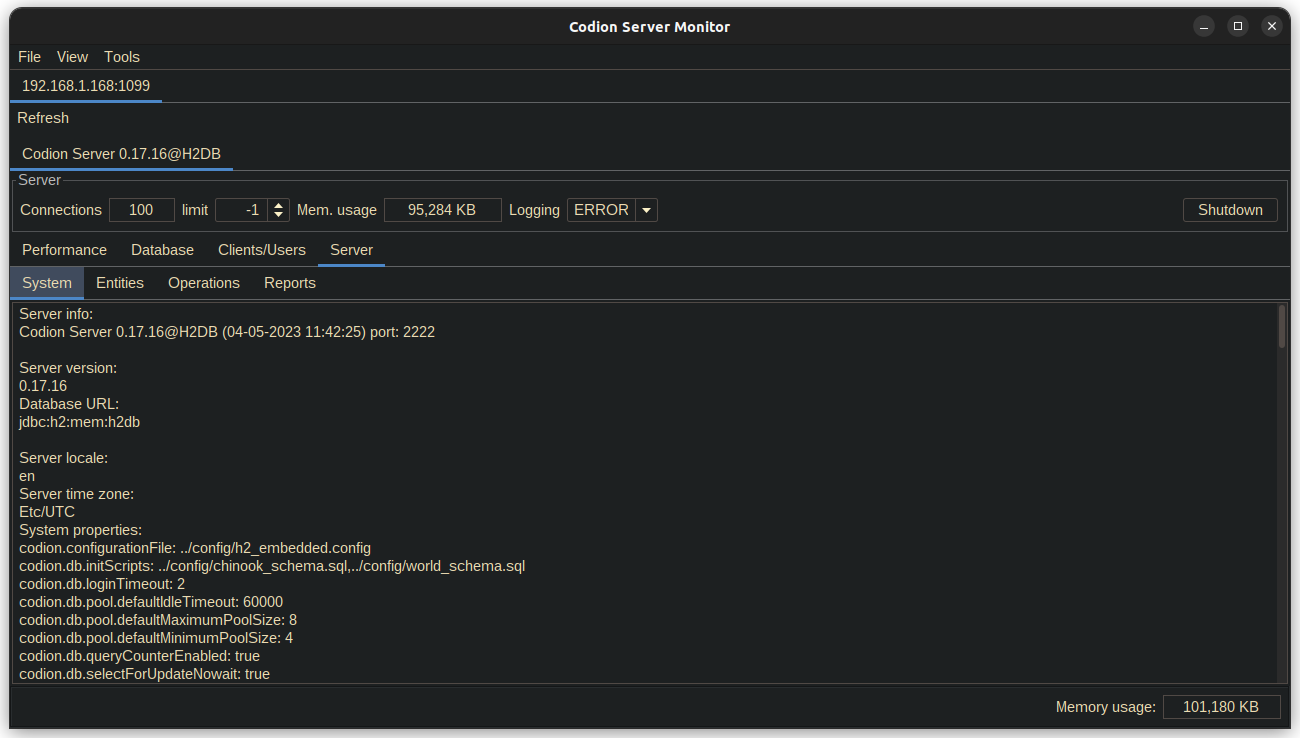
8. Server Monitor
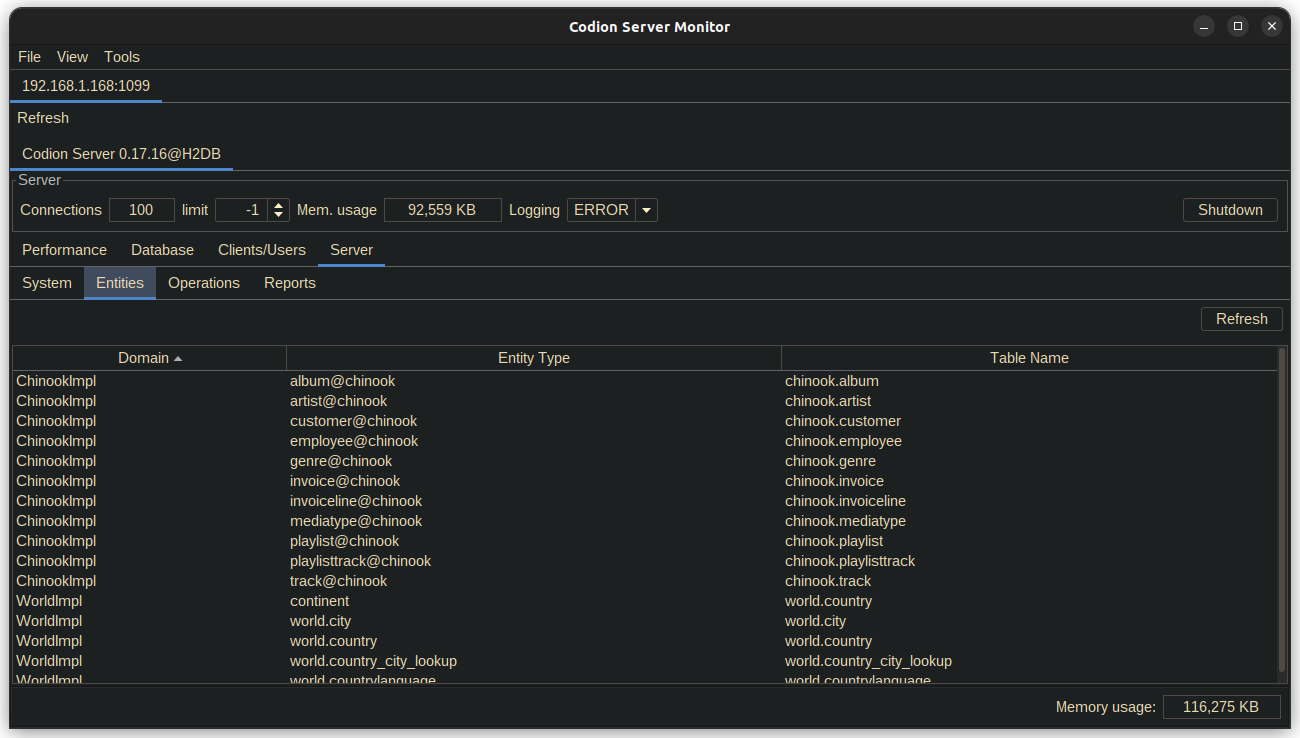
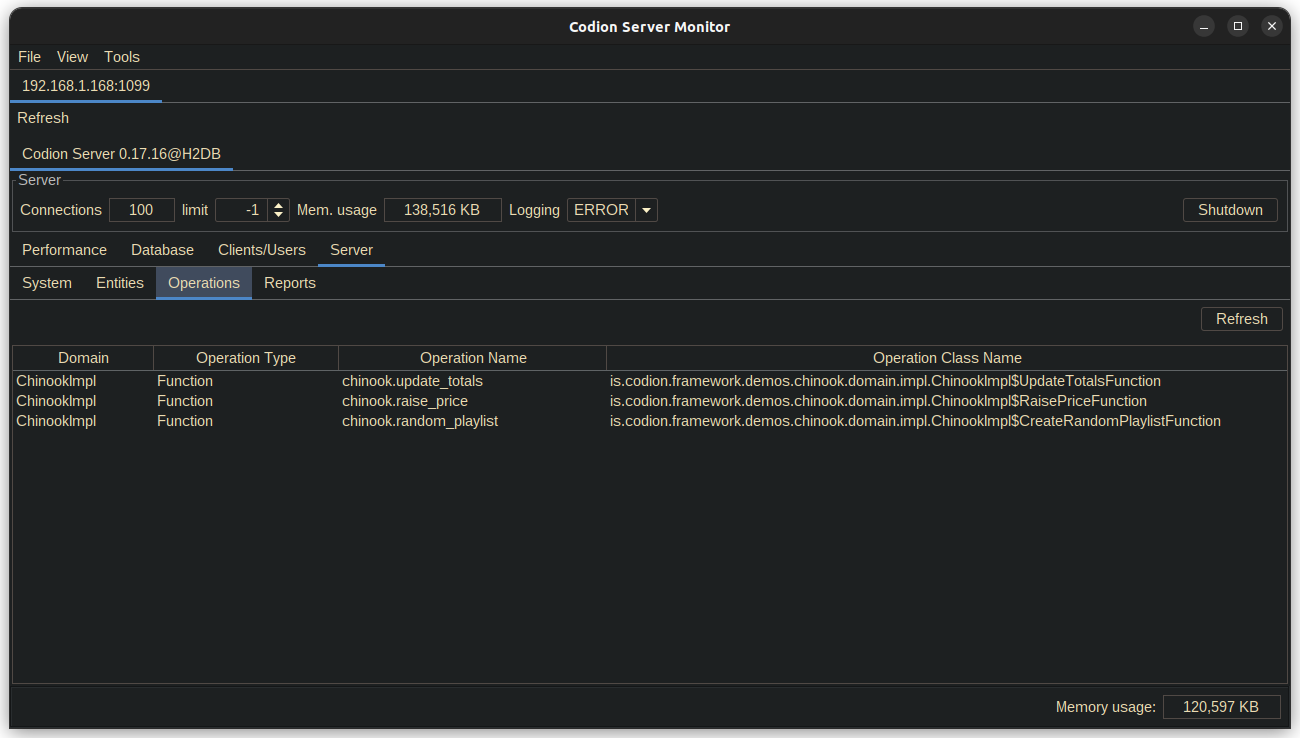
The Codion Server Monitor provides a way to monitor the Codion server.
Below are screenshots of the different server monitor tabs, after ~1 1/2 hours of running the Chinook load test, with ~10 minutes of ramping up to 100 client instances. The server is running on a Raspberry Pi 4, Ubuntu Server 20.10, JDK 19, -Xmx256m, using a HikariCP connection pool on top of an H2 in-memory database.
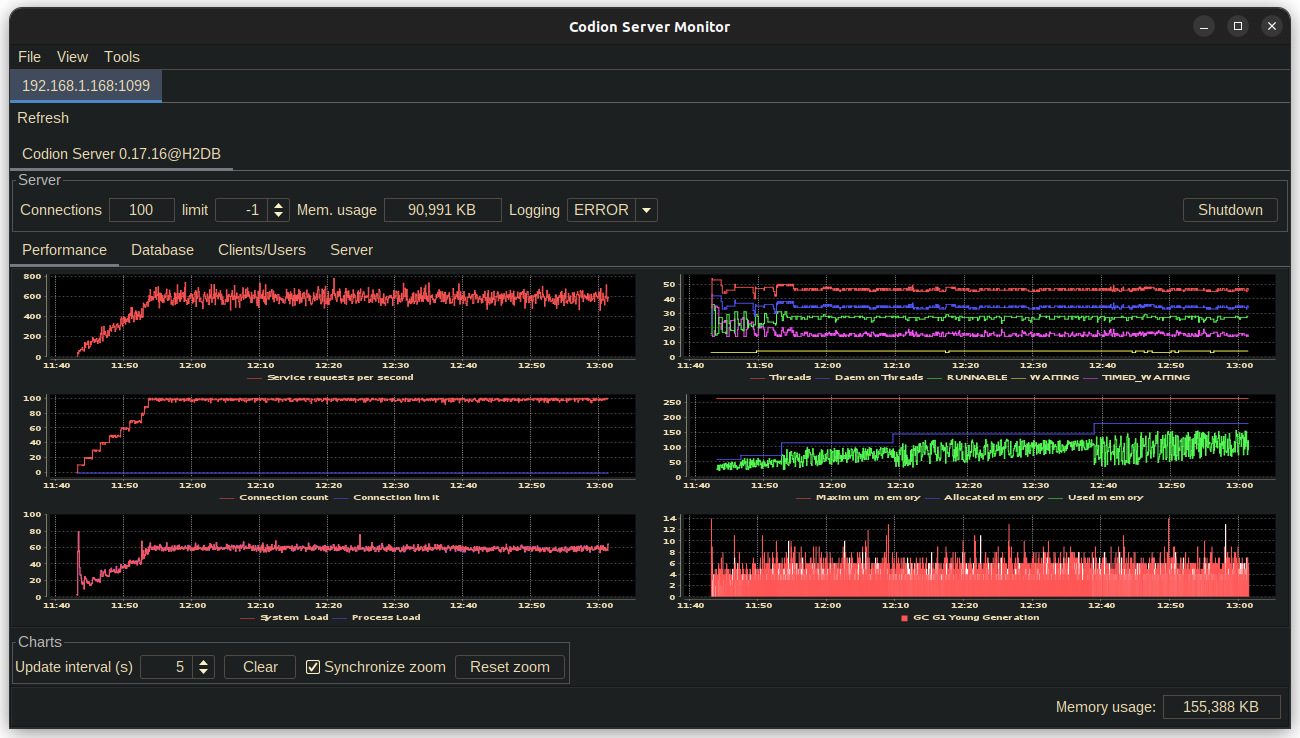
9. Code style and design
9.1. Factories and builders
Most concrete framework classes, which implement a public interface, are final, package private, and are instantiated with the help of static methods in the interface they implement.
9.1.1. Factories
Static factory methods are provided for classes with a simple state. These are usually named after the interface, which makes using static imports quite convenient.
Event<String> event = event(); // Event.event()

Value<Integer> value = Value.nullable();

State state = State.state(true);
9.1.2. Builders
For classes with a more complex state, a builder method is provided in the interface.
TaskScheduler scheduler =
        TaskScheduler.builder()
                .task(() -> {})
                .interval(5, TimeUnit.SECONDS)
                .initialDelay(15)
                .build();

TemporalField<LocalDate> field =
        TemporalField.builder()
                .temporalClass(LocalDate.class)
                .dateTimePattern("dd.MM.yyyy")
                .columns(12)
                .border(createTitledBorder("Date"))
                .build();

EntityConditionModel condition =
        EntityConditionModel.builder()
                .entityType(Customer.TYPE)
                .connectionProvider(connectionProvider)
                .build();
9.2. Accessors
Immutable fields are accessed using methods named after the field, without a get/is prefix.
Observer<String> observer = event.observer();

LocalEntityConnection connection = connectionProvider.connection();

boolean modified = entity.modified();

Entity.Key primaryKey = entity.primaryKey();
A get/is prefix implies that the field is mutable and that a corresponding setter method exists, with a set prefix.
9.2.1. Observables
Many classes expose their internal state via the Value class, which can be used to mutate the associated state or observe it by adding listeners or consumers.
FilterListSelection<List<String>> selection = tableModel.selection();

List<Integer> selectedIndexes = selection.indexes().get();

selection.indexes().set(List.of(0, 1, 2));

selection.items().addListener(() -> System.out.println("Selected items changed"));

table.sortable().set(false);
9.3. Exceptions
There are of course some exceptions to these rules, such as a get prefix on an accessor for a functionally immutable field or a is prefix on an immutable boolean field, but these exceptions are usually to keep the style of a class being extended, such as Swing components and should be few and far between.
Value<Integer> integer = Value.nullable();

boolean isNull = integer.isNull();
boolean isNullable = integer.isNullable();

ValueList<Integer> integers = ValueList.valueList();

boolean isEmpty = integers.isEmpty();
10. Modules
10.1. Common
Common classes used throughout the framework.
codion-common-bom
codion-common-reactive
Dependency graph
codion-common-db
JDBC related classes.
Dependency graph
codion-common-model
Common model classes.
Dependency graph
codion-common-i18n
Dependency graph
codion-common-rmi
RMI related classes.
Dependency graph
codion-common-utilities
Common utilities.
Dependency graph
10.2. DBMS
Database specific implementation classes.
codion-dbms-db2
Dependency graph
codion-dbms-derby
Dependency graph
codion-dbms-h2
Dependency graph
codion-dbms-hsqldb
Dependency graph
codion-dbms-mariadb
Dependency graph
codion-dbms-mysql
Dependency graph
codion-dbms-oracle
Dependency graph
codion-dbms-postgresql
Dependency graph
codion-dbms-sqlite
Dependency graph
codion-dbms-sqlserver
Dependency graph
10.3. Framework
The framework itself.
codion-framework-bom
codion-framework-domain
Domain model related classes.
Dependency graph
codion-framework-domain-db
Domain model generation from a database schema.
Dependency graph
codion-framework-domain-test
Domain model unit test related classes.
Dependency graph
codion-framework-db-core
Core database connection related classes.
Dependency graph
codion-framework-db-local
Local JDBC connection related classes.
Dependency graph
codion-framework-db-rmi
RMI connection related classes.
Dependency graph
codion-framework-db-http
HTTP connection related classes.
Dependency graph
codion-framework-i18n
Internationalization strings.
Dependency graph
codion-framework-json-domain
Dependency graph
codion-framework-json-db
Dependency graph
codion-framework-model
Common framework model classes.
Dependency graph
codion-framework-model-test
General application model unit test related classes.
Dependency graph
codion-framework-server
Framework server classes.
Dependency graph
codion-framework-servlet
HTTP servlet server classes.
Dependency graph
10.4. Swing
Swing client implementation.
codion-swing-common-model
Common Swing model classes.
Dependency graph
codion-swing-common-ui
Common Swing UI classes.
Dependency graph
codion-swing-framework-model
Dependency graph
codion-swing-framework-ui
Dependency graph
10.5. Tools
codion-tools-jul-classpath
Dependency graph
codion-tools-swing-robot
Dependency graph
codion-tools-swing-mcp
Dependency graph
codion-tools-server-monitor-model
Dependency graph
codion-tools-server-monitor-ui
Dependency graph
10.6. Plugins
10.6.1. Logging
codion-plugin-jul-proxy
Dependency graph
codion-plugin-log4j-proxy
Dependency graph
codion-plugin-logback-proxy
Dependency graph
10.6.2. Connection pools
codion-plugin-hikari-pool
Dependency graph
codion-plugin-tomcat-pool
Dependency graph
10.6.4. Look & Feel
Provides Flat Look & Feel based valid and modified indicators.
codion-plugin-flatlaf
Dependency graph
10.6.5. Look & Feel Look And Feels
Provides all available Flat Look & Feels.
codion-plugin-flatlaf-themes
Dependency graph
codion-plugin-flatlaf-intellij-themes
Provides a bunch of IntelliJ Theme based Flat Look & Feels.
Dependency graph
11. Utilities
11.1. IntelliJ IDEA
11.1.1. Live templates
Here are a few live templates for IntelliJ, reducing the typing required when defining a domain model.
Add this file to the templates directory in the IntelliJ IDEA configuration directory.
View template file
<templateSet group="codion">
<template name="cod" value="Column<Double> $ATTRIBUTE_NAME$ = TYPE.doubleColumn("$COLUMN_NAME$");$END$" description="Column<Double>" toReformat="false" toShortenFQNames="true">
<variable name="COLUMN_NAME" expression="" defaultValue="" alwaysStopAt="true" />
<variable name="ATTRIBUTE_NAME" expression="groovyScript("_1.toUpperCase()", COLUMN_NAME)" defaultValue="" alwaysStopAt="true" />
<context>
<option name="JAVA_DECLARATION" value="true" />
</context>
</template>
<template name="coi" value="Column<Integer> $ATTRIBUTE_NAME$ = TYPE.integerColumn("$COLUMN_NAME$");$END$" description="Column<Integer>" toReformat="false" toShortenFQNames="true">
<variable name="COLUMN_NAME" expression="" defaultValue="" alwaysStopAt="true" />
<variable name="ATTRIBUTE_NAME" expression="groovyScript("_1.toUpperCase()", COLUMN_NAME)" defaultValue="" alwaysStopAt="true" />
<context>
<option name="JAVA_DECLARATION" value="true" />
</context>
</template>
<template name="col" value="Column<Long> $ATTRIBUTE_NAME$ = TYPE.longColumn("$COLUMN_NAME$");$END$" description="Column<Long>" toReformat="false" toShortenFQNames="true">
<variable name="COLUMN_NAME" expression="" defaultValue="" alwaysStopAt="true" />
<variable name="ATTRIBUTE_NAME" expression="groovyScript("_1.toUpperCase()", COLUMN_NAME)" defaultValue="" alwaysStopAt="true" />
<context>
<option name="JAVA_DECLARATION" value="true" />
</context>
</template>
<template name="cos" value="Column<String> $ATTRIBUTE_NAME$ = TYPE.stringColumn("$COLUMN_NAME$");$END$" description="Column<String>" toReformat="false" toShortenFQNames="true">
<variable name="COLUMN_NAME" expression="" defaultValue="" alwaysStopAt="true" />
<variable name="ATTRIBUTE_NAME" expression="groovyScript("_1.toUpperCase()", COLUMN_NAME)" defaultValue="" alwaysStopAt="true" />
<context>
<option name="JAVA_DECLARATION" value="true" />
</context>
</template>
<template name="fk" value="ForeignKey $ATTRIBUTE_NAME$ = TYPE.foreignKey("$FK_NAME$", $END$);" description="ForeignKey" toReformat="false" toShortenFQNames="true">
<variable name="FK_NAME" expression="" defaultValue="" alwaysStopAt="true" />
<variable name="ATTRIBUTE_NAME" expression="groovyScript("_1.toUpperCase()", FK_NAME)" defaultValue="" alwaysStopAt="true" />
<context>
<option name="JAVA_DECLARATION" value="true" />
</context>
</template>
<template name="cold" value="Column<LocalDate> $ATTRIBUTE_NAME$ = TYPE.localDateColumn("$COLUMN_NAME$");$END$" description="Column<LocalDate>" toReformat="false" toShortenFQNames="true">
<variable name="COLUMN_NAME" expression="" defaultValue="" alwaysStopAt="true" />
<variable name="ATTRIBUTE_NAME" expression="groovyScript("_1.toUpperCase()", COLUMN_NAME)" defaultValue="" alwaysStopAt="true" />
<context>
<option name="JAVA_DECLARATION" value="true" />
</context>
</template>
<template name="coldt" value="Column<LocalDateTime> $ATTRIBUTE_NAME$ = TYPE.localDateTimeColumn("$COLUMN_NAME$");$END$" description="Column<LocalDateTime>" toReformat="false" toShortenFQNames="true">
<variable name="COLUMN_NAME" expression="" defaultValue="" alwaysStopAt="true" />
<variable name="ATTRIBUTE_NAME" expression="groovyScript("_1.toUpperCase()", COLUMN_NAME)" defaultValue="" alwaysStopAt="true" />
<context>
<option name="JAVA_DECLARATION" value="true" />
</context>
</template>
<template name="et" value="EntityType TYPE = DOMAIN.entityType("$TABLE_NAME$");$END$" description="EntityType" toReformat="false" toShortenFQNames="true">
<variable name="TABLE_NAME" expression="" defaultValue="" alwaysStopAt="true" />
<context>
<option name="JAVA_DECLARATION" value="true" />
</context>
</template>
<template name="cob" value="Column<Boolean> $ATTRIBUTE_NAME$ = TYPE.booleanColumn("$COLUMN_NAME$");$END$" description="Column<Boolean>" toReformat="false" toShortenFQNames="true">
<variable name="COLUMN_NAME" expression="" defaultValue="" alwaysStopAt="true" />
<variable name="ATTRIBUTE_NAME" expression="groovyScript("_1.toUpperCase()", COLUMN_NAME)" defaultValue="" alwaysStopAt="true" />
<context>
<option name="JAVA_DECLARATION" value="true" />
</context>
</template>
<template name="cosh" value="Column<Short> $ATTRIBUTE_NAME$ = TYPE.shortColumn("$COLUMN_NAME$");$END$" description="Column<Short>" toReformat="false" toShortenFQNames="true">
<variable name="COLUMN_NAME" expression="" defaultValue="" alwaysStopAt="true" />
<variable name="ATTRIBUTE_NAME" expression="groovyScript("_1.toUpperCase()", COLUMN_NAME)" defaultValue="" alwaysStopAt="true" />
<context>
<option name="JAVA_DECLARATION" value="true" />
</context>
</template>
<template name="coc" value="Column<Character> $ATTRIBUTE_NAME$ = TYPE.characterColumn("$COLUMN_NAME$");$END$" description="Column<Character>" toReformat="false" toShortenFQNames="true">
<variable name="COLUMN_NAME" expression="" defaultValue="" alwaysStopAt="true" />
<variable name="ATTRIBUTE_NAME" expression="groovyScript("_1.toUpperCase()", COLUMN_NAME)" defaultValue="" alwaysStopAt="true" />
<context>
<option name="JAVA_DECLARATION" value="true" />
</context>
</template>
<template name="coodt" value="Column<OffsetDateTime> $ATTRIBUTE_NAME$ = TYPE.offsetDateTimeColumn("$COLUMN_NAME$");$END$" description="Column<OffsetDateTime>" toReformat="false" toShortenFQNames="true">
<variable name="COLUMN_NAME" expression="" defaultValue="" alwaysStopAt="true" />
<variable name="ATTRIBUTE_NAME" expression="groovyScript("_1.toUpperCase()", COLUMN_NAME)" defaultValue="" alwaysStopAt="true" />
<context>
<option name="JAVA_DECLARATION" value="true" />
</context>
</template>
<template name="coby" value="Column<byte[]> $ATTRIBUTE_NAME$ = TYPE.byteArrayColumn("$COLUMN_NAME$");$END$" description="Column<byte[]>" toReformat="false" toShortenFQNames="true">
<variable name="COLUMN_NAME" expression="" defaultValue="" alwaysStopAt="true" />
<variable name="ATTRIBUTE_NAME" expression="groovyScript("_1.toUpperCase()", COLUMN_NAME)" defaultValue="" alwaysStopAt="true" />
<context>
<option name="JAVA_DECLARATION" value="true" />
</context>
</template>
</templateSet>Available templates
| Name | Template |
|---|---|
et |
EntityType TYPE = DOMAIN.entityType("table_name"); |
fk |
ForeignKey FK_KEY = TYPE.foreignKey("fk_key"); |
cosh |
Column<Short> COLUMN = TYPE.shortColumn("column"); |
coi |
Column<Integer> COLUMN = TYPE.integerColumn("column"); |
col |
Column<Long> COLUMN = TYPE.longColumn("column"); |
cod |
Column<Double> COLUMN = TYPE.doubleColumn("column"); |
cos |
Column<String> COLUMN = TYPE.stringColumn("column"); |
cold |
Column<LocalDate> COLUMN = TYPE.localDateColumn("column"); |
coldt |
Column<LocalDateTime> COLUMN = TYPE.localDateTimeColumn("column"); |
coodt |
Column<OffsetDateTime> COLUMN = TYPE.offsetDateTimeColumn("column"); |
cob |
Column<Boolean> COLUMN = TYPE.booleanColumn("column"); |
coc |
Column<Character> COLUMN = TYPE.characterColumn("column"); |
coby |
Column<byte[]> COLUMN = TYPE.byteArrayColumn("column"); |
12. Internationalization (i18n)
The framework’s own strings — messages, control captions, dialog texts — are resource-bundle based and ship in English and Icelandic; applications localize their domain the same way, with plain Java resource bundles. The active language follows the default locale, so localization is selected with Locale.setDefault() during application startup, before any UI is created.
12.1. Localizing the domain
Entity and attribute captions are localized by associating an EntityType with a resource bundle, by passing a class when defining it:
interface Artist {
    EntityType TYPE = DOMAIN.entityType("chinook.artist", Artist.class);
    ...
}
The bundle is resolved from the class name — here Chinook$Artist.properties — with the entity type name as the key for the entity caption and attribute names for attribute captions:
# Chinook$Artist.properties
chinook.artist=Artists
name=Name
number_of_albums=Number of albums
Adding a language is then a matter of providing the locale-suffixed sibling — Chinook$Artist_is_IS.properties — for each entity, as the Chinook demo does for Icelandic. A caption found in the resource bundle takes precedence over one defined in code via .caption(); with neither, the attribute name serves as the caption.
12.2. Overriding
The default i18n strings can be overridden by implementing Resources and registering the implementation with the ServiceLoader.
package is.codion.demos.chinook.i18n;

import is.codion.common.utilities.resource.Resources;
import is.codion.framework.i18n.FrameworkMessages;

import java.util.Locale;

/**
 * Replace the english modified warning text and title.
 */
public final class ChinookResources implements Resources {

  private static final String FRAMEWORK_MESSAGES =
          FrameworkMessages.class.getName();

  private final boolean english = Locale.getDefault()
          .equals(new Locale("en", "EN"));

  @Override
  public String getString(String baseBundleName, String key, String defaultString) {
    if (english && baseBundleName.equals(FRAMEWORK_MESSAGES)) {
      return switch (key) {
        case "modified_warning" -> "Unsaved changes will be lost, continue?";
        case "modified_warning_title" -> "Unsaved changes";
        default -> defaultString;
      };
    }

    return defaultString;
  }
}
module is.codion.demos.chinook {
...
provides is.codion.common.utilities.resource.Resources
with is.codion.demos.chinook.domain.impl.ChinookResources;
}See Chinook demo.
12.3. i18n Property Values
For a complete reference of all available i18n property keys and their default values, see i18n Property Values Reference.